


Appointment Field Defs
Appointment Field Defs allow users to organize notes specific to a patient appointment.
In the Main Menu, click Setup, Appointments, Appointment Field Defs.
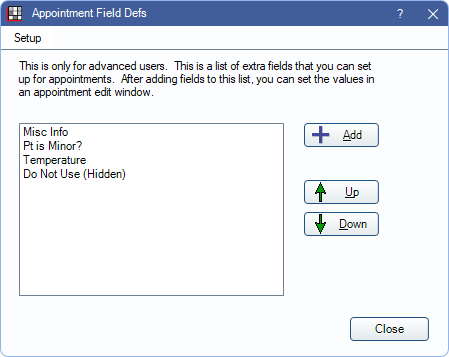
Existing Appointment Field Defs list. Definitions marked as hidden display with (hidden) next to the name.
- Setup: Click to open Field Display and choose which Appointment Field Defs show in Edit Appointment.
- Add: Click to create a new Appointment Field Def.
- Up / Down: Select a field, then click to reorder it in the list.
Setup / Field Display
From Field Display, choose which Appointment Field Defs are visible or hidden in the Edit Appointment window.
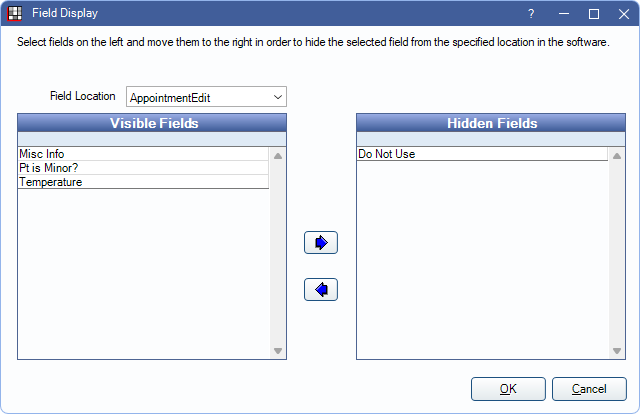
Field Location: Determine which fields to edit. By default, AppointmentEdit is selected. Other Patient Fields can be selected from the dropdown as well.
Use the left and right arrows to move fields to the Visible and Hidden Fields columns.
- Visible Fields: Lists all appointment fields currently showing on the Edit Appointment window.
- Hidden Fields: Lists appointment fields that have been marked hidden, and do not show on the Edit Appointment window.
Appointment Field Defs that are not in use or fields in use (i.e., a value has been entered into the field) but not added to an appointment view can be hidden. Fields in use and added to an appointment view cannot be hidden; a warning displays when attempting to hide these fields.
Edit Appointment Field Def
Click Add to create a new Appointment Field Def or double-click an existing field to edit. The Edit Appointment Field Def window opens.
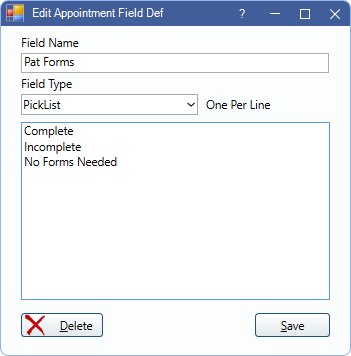
- Field Name: Enter the name of the field.
- Field Type: Select the type of field.
- Text: Users can type any text.
- PickList: Users select from a list of items. Enter one item on each line.
Delete: If no data has been entered in custom appointment field for a patient, it can be deleted.
Using Appt Fields:
Appointment Fields display Appt Fields section of the Edit Appointment window.
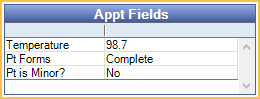
To enter a value, double-click the field. If the field type is Text, users can type in a response. If the field type is PickList, users are prompted to choose a response from the preset list.
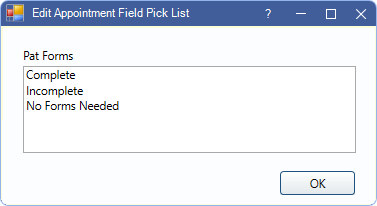
Click OK to save. The text or selected response is now displayed on the appointment.
Information entered in the Appointment Field can also be displayed in an appointment box on the schedule (Appointment Views).