


Benefits
Custom benefits can be entered on an insurance plan to calculate procedure estimates and insurance remaining estimates.
In an Insurance Plan, at the lower right, is the Benefit Information.
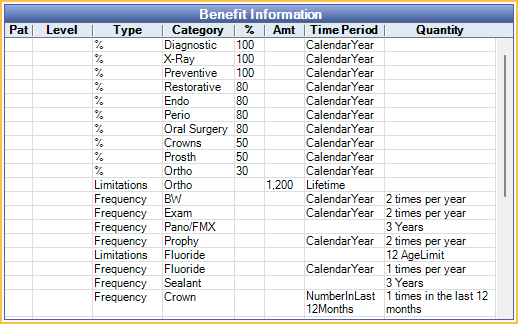
Benefits apply to all subscribers on the plan. If different subscribers have different benefits, create different plans. If a user changes benefits for a plan, all Claim Procedures ( claimprocs ) estimates also change, including those on current and sent claims. Sent claims need to be recalculated before changes affect claim estimates.
To change or view benefits, double-click anywhere in the grid. To change benefit information, the Insurance Plan Edit security permission is required.
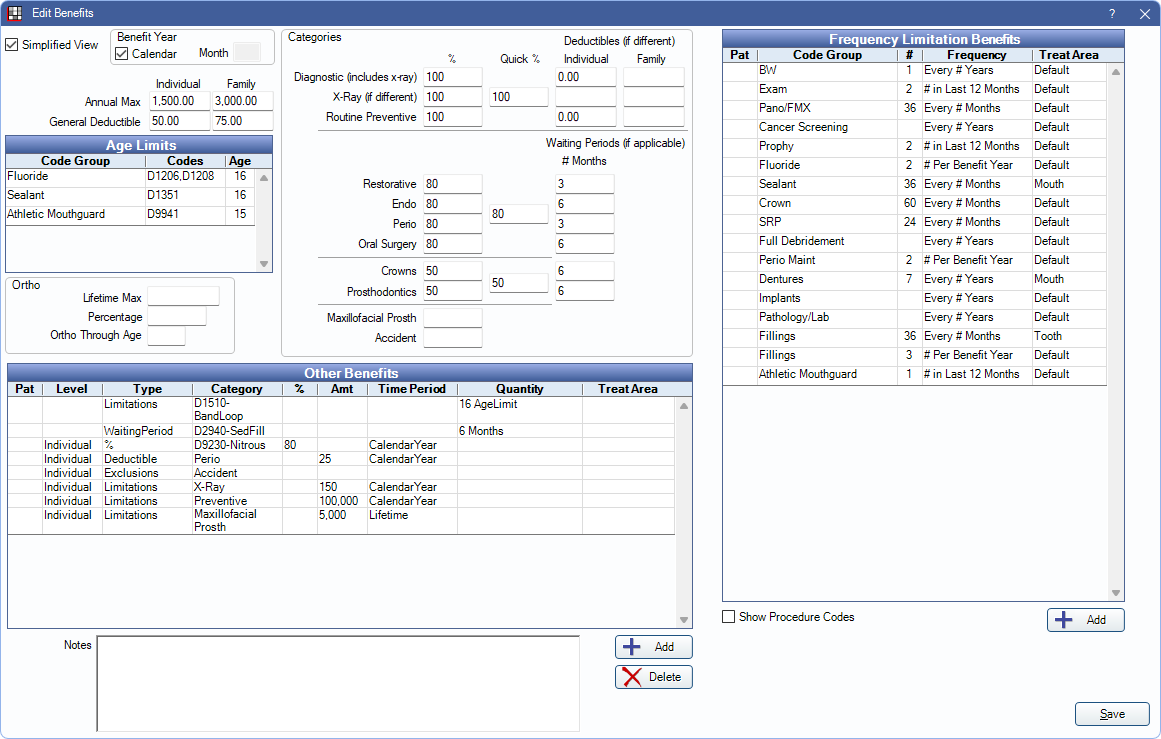
There are two view options for the Edit Benefit window.
- Simplified View (default): This view allows quick data entry and organizes benefit information by field. See below for a description of each field.
- Row view: If Simplified View is unchecked, benefits are represented by rows. See Edit Benefits - Row View. This is useful if typical insurance categories are not used (e.g., are in a country other than the U.S. or Canada).
Benefit Year: (This area is the same between Simplfied View or Row View.) The renewal date used to calculate benefits and the current benefit year. It applies to all benefits in the window.
- If plan follows calendar year (starts in January; ends in December): Check this box.
- If the plan follows a service year (starts in a month other than January): Uncheck the box, then enter the two-digit month when benefits renew in the Month field (e.g., October = 10, February = 02).
Simplified View
The fields that show in Simplified View are described below. Click in a field to enter values. Leaving a box blank is different than entering a zero; blank means unknown.
Annual Max: The maximum annual amount insurance pays in benefits per individual or family. If left blank, Insurance Remaining Calculations cannot be done.
- Individual: Enter the annual max amount for the individual.
- Family: Enter the annual max amount for the entire family. Leave blank if If there is no Family Annual Max for the plan.
General Deductible: The amount the individual or family pays out of pocket before the insurance company will begin to pay. Applies to procedures in any Insurance Category. See Insurance Categories for details. Resets at the start of the new service or calendar year.
- Individual: Enter the deductible amount for the individual. If the Family Deductible has already been met, the Individual Deductible is not be applied.
- Family: Enter the deductible amount for the entire family. If the Family Deductible has been met by a family member or combination of family members, Individual Deductibles are no longer applied. Leave blank if there is no Family Deductible for the plan.
Fluoride Through Age: Creates an age limitation for fluoride procedures. Bases estimates off codes entered in Insurance Frequencies. 0 is not a valid entry.
Sealants Through Age: Creates an age limitation for sealant procedures. Bases estimates off codes entered in Insurance Frequencies. 0 is not a valid entry.
Ortho: Enter orthodontic benefit information.
- Lifetime Max: The maximum orthodontic benefit. This is separate from the individual and family Annual Max above as long as the insurance category spans are set correctly. The correct setup (and default) is to have an Ortho span of D8000 to D8999 and to exclude that span from the General category.
- Percentage: The percentage per procedure that is covered. This affects insurance estimates.
- Ortho Through Age: Used with codes that fall into Ortho insurance category span. This affects insurance estimates. 0 is not a valid entry.
Categories:
- Percentages (%): The percent covered per procedure for each category.
- For quick entry of the same percentage amount, enter the amount in the Quick % box. Values are automatically populated in the associated % fields.
- Deductibles (if different): The deductible per individual or family for a specific category, if it is different than the General Deductible.
- Zero indicates there is no deductible at all. If blank, the General Deductible is used. See Deductibles.
- Waiting Periods (if applicable): The number of months a patient must wait before insurance covers a procedure.
- An effective date must be entered in the Insurance Plan, Subscriber Information for waiting periods to calculate.
Frequency Limitation Benefits: Enter insurance frequency limitations in the grid. Any Code Groups that have been created are listed in the grid by default. Additional benefits can be created as needed. See Frequency Limitations for more detailed information.
Other Benefits: Benefits that are specific to this insurance plan. Useful for incentive plans, or to override typical insurance percentages or amounts. See Other Benefits section below for more information.
Notes: This is the same as the subscriber note on the Edit Insurance Plan window. Certain types of benefits that just affect the subscriber are not easily codified, so do not have a box. These types of benefits are just entered as subscriber notes. This text box supports Right-Click Options.
Other Benefits
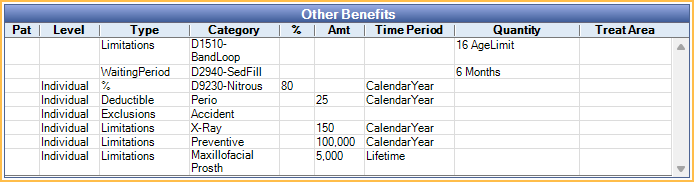
There are different types of Other Benefits. These are discussed below. Only specific Other Benefit scenarios are functional. For more information, see, Other Benefits.
- ActiveCoverage: Informational only. Not normally used. Used to show a patient has coverage, but without any specific information (e.g., percentage).
- Percentage (CoInsurance): Percentage insurance will cover of a certain procedure or category.
- Deductible: Dollar amount the individual or family must pay before insurance coverage begins.
- CoPayment: Informational only. Patient portion owed for a procedure. Copayments should be entered into a copay fee schedule instead. Any copays entered into insurance benefits are non-functional. See: Fee Schedules for more information.
- Exclusions: Services that are not covered by insurance. These can be procedure categories or individual codes.
- Limitations: Includes multiple limitation types such as maximums frequency or age.
- Waiting Period: Time period after the insurance effective date the insured must wait prior to insurance covering a benefit.
Benefit Hierarchy
Benefits are calculated one procedure at a time. Multiple benefits can apply to a single procedure code. If some benefits are of the same type, there is a hierarchy to determine which benefits affect insurance estimates.
1. Benefits applied to the specific procedure code.

2. Benefits applied to an Insurance Category containing the procedure code. If the procedure is included in multiple categories, benefits for categories lower in the list take higher priority.

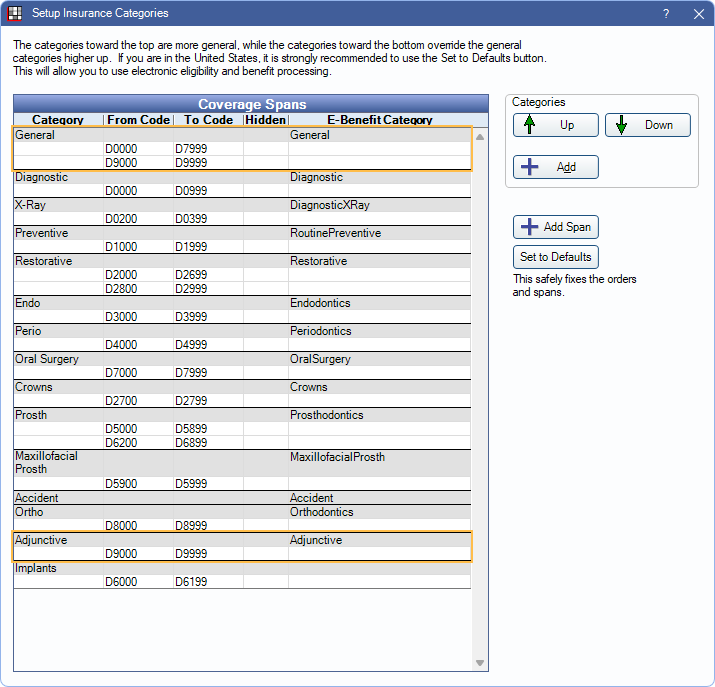
Example:

If D4910 is in both the General and Perio categories, the Perio benefit supersedes the General benefit, because the category is more specific (lower in the Insurance Categories list). If no other benefits existed for the procedure, insurance would cover the procedure at 80% Perio rate, not the 70% General rate.
Because there is a benefit specifically for D4910, this supersedes the benefits for any category. Even though D4910 is included in the Perio and General categories, the procedure will actually be covered at 100%.
Consideration of Other Procedures
Benefits are calculated one procedure at a time, however it may be necessary to consider benefits applied to other procedures. Time spans can be large, and information may be considered from multiple patients. For example, when calculating an ortho lifetime max, it is necessary to consider all procedures, regardless of treatment date, and a family annual max requires considering procedures from all patients under the same subscriber. When considering other procedures:
- Completed procedures attached to claims are always considered, regardless of if payment is received or still estimated.
- Treatment planned procedures are only considered when they are ordered before the current procedure. The order is as displayed in the Treatment Plan Module.
For Frequency Limitations, procedures affect frequency once attached to a claim. If the claim is denied (i.e., insurance pays $0), the procedure is no longer considered. Dates entered into Insurance History are also be considered. Completed procedures not attached to a claim are not considered.