


Feature Requests
The Feature Request system is a unique tool that allows offices to vote on features they want in Open Dental.
In the Main Menu, click Help, Request Features.
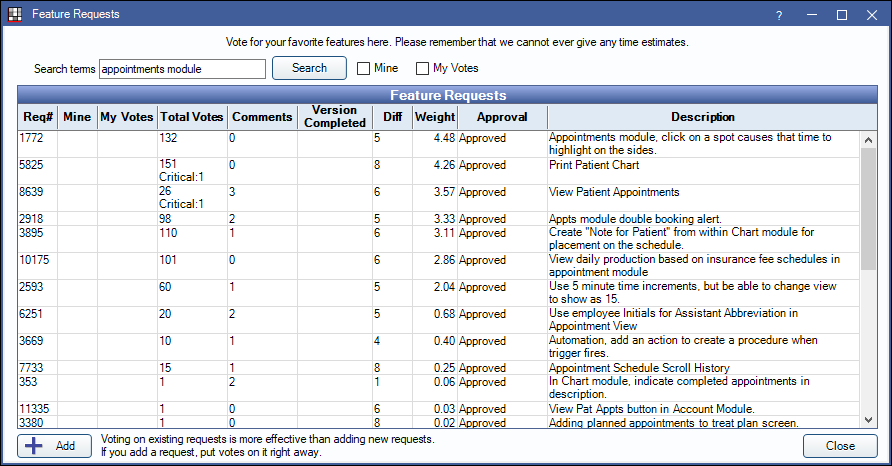
Every office can vote on requests and submit new requests. The voting process takes time but helps us prioritize requested features. Open Dental does not supply estimates on when a Feature Request might be implemented or guarantee that every request will become a feature.
 See our QuickTip Video: Feature Requests
- Search terms: Enter a search term or Request Number. Leave field blank to view all requests. Click Search to update results in the Feature Requests grid.
- Mine: Only search for requests created by your office.
- My Votes: Only search for requests your office has voted on.
- Add: Click to add a new request. See Add a New Request section below for details.
Click a column to sort results.
View or Vote on a Request
Double-click an existing request to view details.
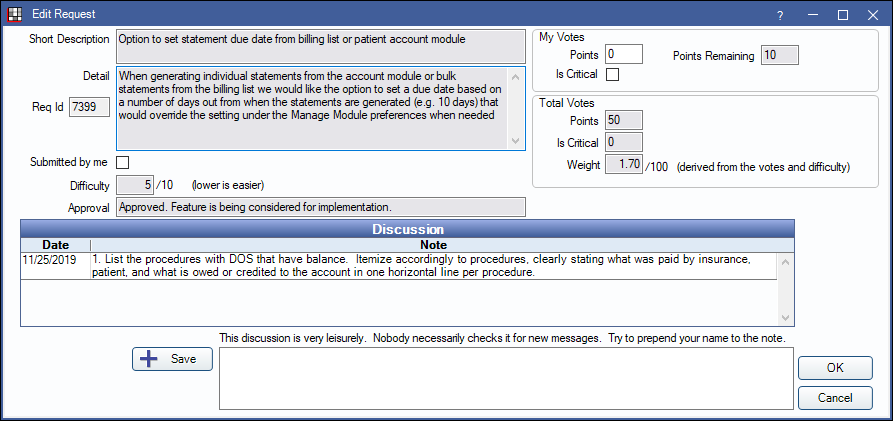
My Votes: Use the My Votes section to vote on a Feature Request.
- Points: Enter the number of votes to apply to the request. The office can edit points on features not currently marked InProgress. Any points voted to InProgress features are unavailable and are automatically returned to Points Remaining once the feature is complete.
- Points Remaining: Total number of voting points not currently allocated to Feature Requests. Each office is given 100 points to start.
- Is Critical: Check to mark feature as critical. Each office can mark up to two Feature Requests as critical.
Totals: These are the totals of all votes and criticals from all Open Dental users.
- Points: The total number of votes allocated to this Feature Request.
- Is Critical: The total number of offices that have marked this request as critical.
- Weight: An internal calculation used by Open Dental Headquarters (HQ) to determine the value of a Feature Request.
Discussion: Users can add notes about the request. These notes are not monitored but are useful for clarity or encouragement.
- Save: Type notes then click to add to the Feature Request. We suggest prepending the note with a name.
Add a New Request
Click Add to create a new request. Before creating a new request, be sure to search for an existing request to avoid duplicates.
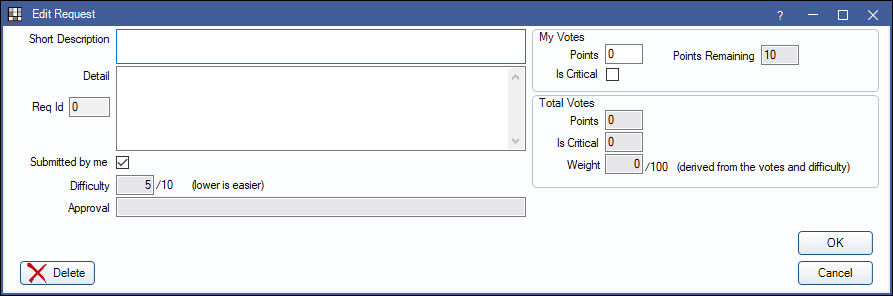
Short Description: Enter a brief description of the request.
Detail: Enter details about the request. Add plenty of detail to help Open Dental HQ fully understand the request.
Points: Add points (votes) to the request. Use the Points Remaining to determine how many votes to allocate to the request.
Click OK to submit the request.
Improving Feature Request Visibility
To increase the chances of the Feature Request being implemented, use this system to your advantage:
- Vote for your request. If there are no votes, then the request cannot be seen by anyone else.
- Mark it critical.
- Use the Open Dental Community (User Forum, Facebook User Group, etc) to promote your feature and get others interested in voting for it.