


Laboratories
In the Main Menu, click Setup, Laboratories.
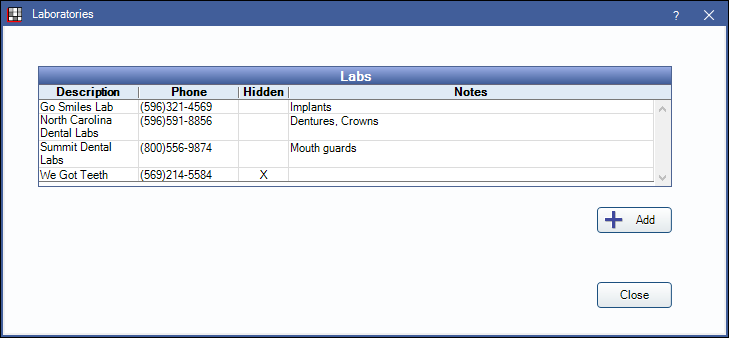
The Laboratory list contains details about the laboratories an office sends Lab Cases to.
Click Add to create a new lab or double-click on an existing lab to edit.
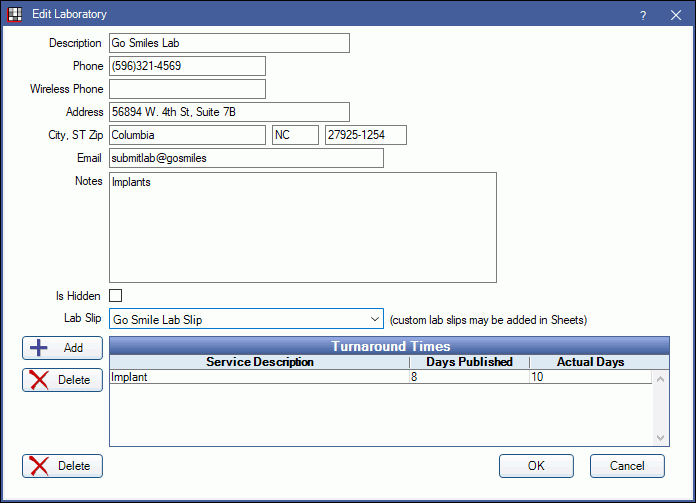
Enter lab details:
- Description: Name of laboratory.
- Phone: Contact phone number.
- Wireless Phone: Additional contact phone number.
- Address: Laboratory address.
- City / State / Zip: City, state, and zip code of laboratory.
- Email: Email address for laboratory.
- Notes: Any related notes for the laboratory.
Is Hidden: Check to hide laboratories no longer in use.
Lab Slip: Select the default lab slip sheet template to use for this lab. See Lab Slip Layout to customize a lab slip.
Turnaround Times: Enter turnaround times for services provided by the lab. Adding, editing, and deleting turnaround times affects due date calculations for future lab cases, not existing ones.
Click Add, or double-click a service to edit.
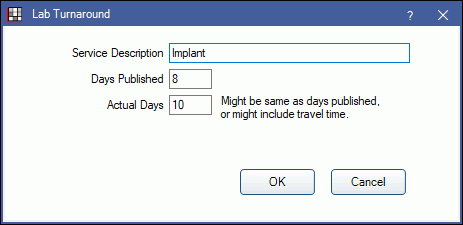
Enter the turnaround information:
- Service Description: The service offered by the lab.
- Days Published: The turnaround time published by the lab.
- Actual Days: Might be one or two days longer to account for travel time or padding time.