


Medical
The medical area shows patient medical information.
In the Chart Module, double-click the pink Medical area. Click the Medical Info tab.
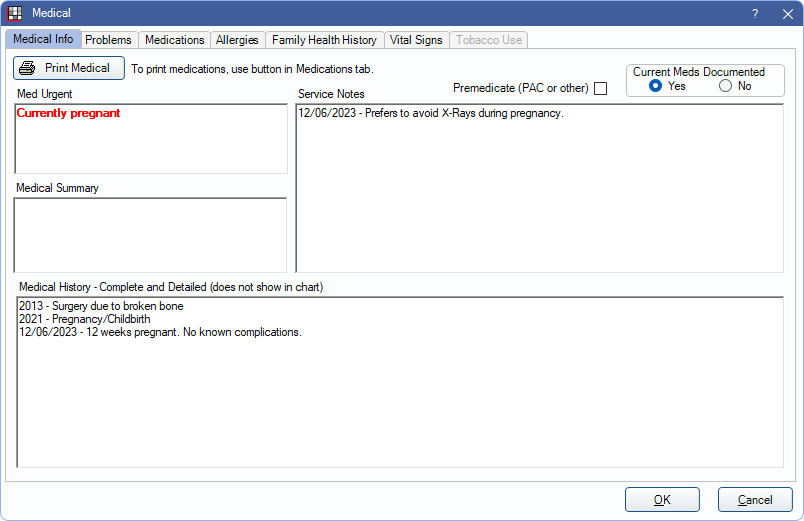
Other tabs accessible from this window:
- Problems: Lists patient's active and inactive problems.
- Medications: Lists patient's current and discontinued medications.
- Allergies: Lists patient's current and inactive allergies.
- Family Health History: The health history of a patient's family members. This tab is only visible when EHR is enabled.
- EHR Vital Signs: Documents the patient's pulse, height, weight, and/or blood pressure, and any interventions.
- EHR Tobacco: Assess the patient's smoking status, tobacco use, and document interventions. This tab is only visible when EHR is enabled.
Medical Info Tab
Use the Medical Info tab to record medical information about the patient.
- Print Medical: Print a list of the patient's problems, allergies, medical history, premedicate status (Y/N), medically urgent notes, and medical summary. Only prints one page.
- Premedicate: Check to indicate the patient needs to be premedicated. If checked and the PremedFlag is added to an appointment view, Premedicate shows in the Chart Module, medical area (bold red) and in the appointment box. It also shows when hovering over an appointment if Med Flag is added to the appointment bubble in Display Fields.
- Current Meds Documented: Only used with EHR. See EHR Attest Medications Documented.
- Med Urgent: Urgent medical notes about the patient. Entered text shows in bold red in the Chart Module, medical area. Med Urgent notes can be added to an appointment view and the appointment bubble for additional visibility.
- Medical Summary: A brief medical summary. Entered text shows in the Chart Module, medical area.
- Service Notes: Useful information that is learned through discussions with patients, such as whether they need a blanket or pillow, nervous behavior, whether they are on a strict budget, etc. Shows in the Chart Module, medical area.
- Medical History: The patient's medical history. Information from the Medical History form should be entered here so that provider's have an easy-to-read history. This information is not archived and should be entered as chart notes as well.
Right-Click in any text box for additional options.
Medical information displays in the Chart Module, under Patient Info in pink.
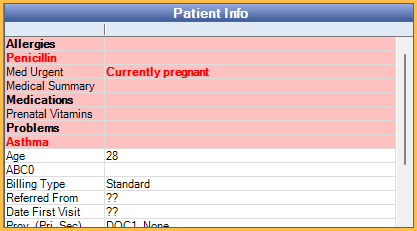
The fields that display can be customized in Display Fields, ChartPatientInformation. To change the background color, see Definitions: Misc Colors.