

Search
Dental School Courses
Each course tracked in Open Dental can be added to the Dental School Courses list.
In Dental School Setup, click Courses

Courses must be defined before Dental Student Evaluations can be created. Optionally, Dental School Course Definitions can be created as templates before adding the full course details.
Courses are sorted by Course ID. Alphabetically first, then ascending numerically .
Edit Dental School Course
Click Add to add a course from Course Defs, or create a blank course.
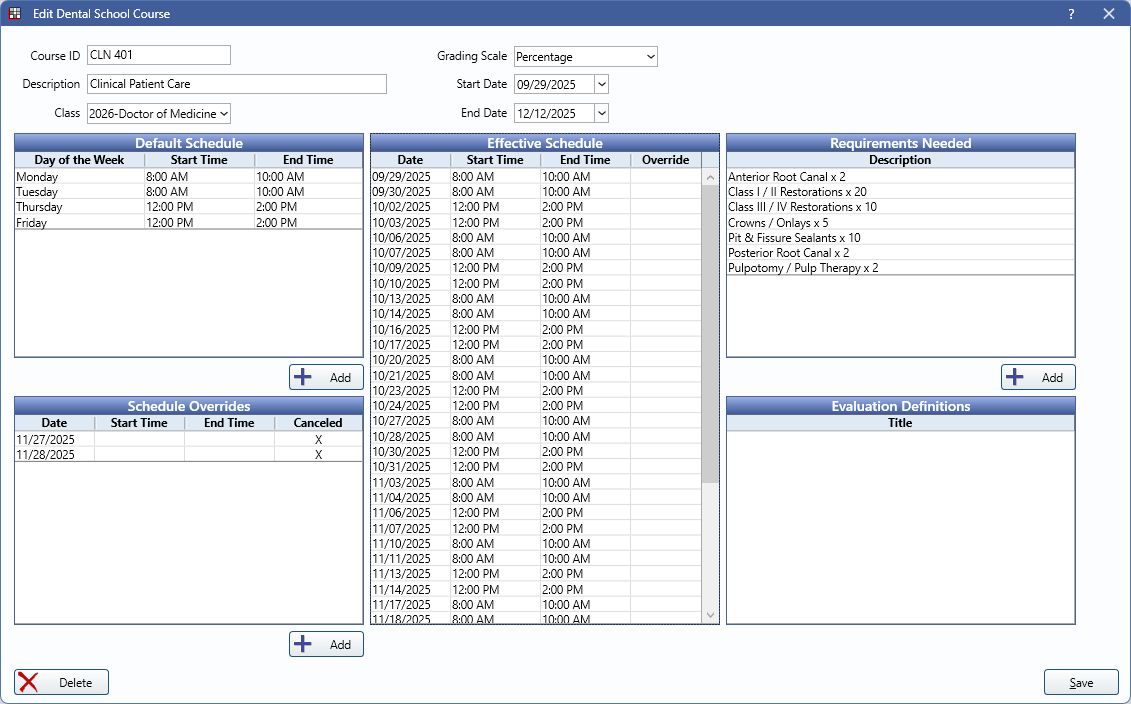
Course Details: All course details are requires.
- Course ID: Enter the course ID. Prefilled if adding from a Course Def.
- Description: Enter the course description. Prefilled if adding from a Course Def.
- Class: Select the Class to associate with the course.
- Grading Scale: Select the Grading Scale to use with the course.
- Start Date: Select the course start date.
- End Date: Select the course end date.
Default Schedule: Click Add to add course schedule details. Prefilled if adding from a Course Def.
Effective Schedule: Automatically inserted using the Default Schedule and Start and End dates.
Requirements Needed: Click Add to add requirements to the course. Prefilled if adding from a Course Def.
Schedule Overrides: Click Add to add a schedule override (e.g., cancelled classes or changed class times).
Evaluation Definitions: Not yet in use.
Click Delete to remove the course. Click Save to save changes.