
Search
File Monitor
The File Monitor window shows read and write actions to the AtoZ folder (i.e., OpenDentImages) as they execute in real-time.
In the Main Menu, click Help, File Monitor.
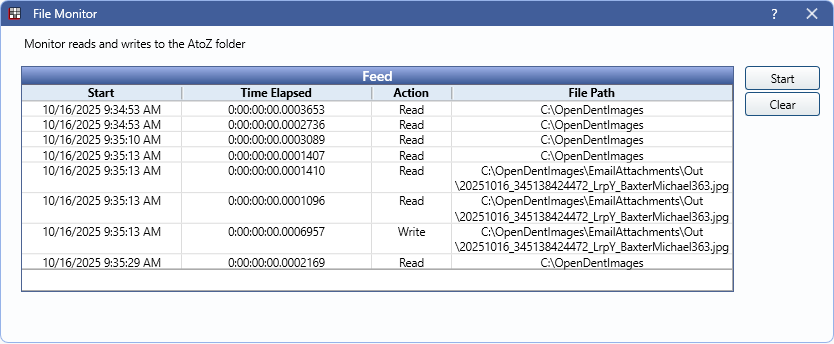
This window can remain open in the background to allow monitoring during normal use of the program. Activity displayed is only from the instance of Open Dental from which it was launched.
Cloud based storage methods (i.e., DropBox, SFTP, etc.) and local path overrides do not check to see if the AtoZ folder exists, so fewer actions are logged when using these methods.
Feed: Grid shows details on read and write actions to the AtoZ folder.
- Start: Recorded date and time of the read or write action.
- Time Elapsed: Amount of time to complete the action.
- Action: Displays whether the AtoZ folder was read or written to.
- File Path: Displays the File Path the action was performed to or from.
Start/Stop: Click to begin monitoring AtoZ folder actions. If monitoring is already in progress, click Stop to suspend monitoring actions.
Clear: Click to remove existing rows from the Feed.