

Search
Upload Mass Email Recipients
Mass Email allows an office to send marketing campaigns to a specified list of of existing patients through an integration with Mailchimp.
In the Main Menu, click Tools, Mass Email.
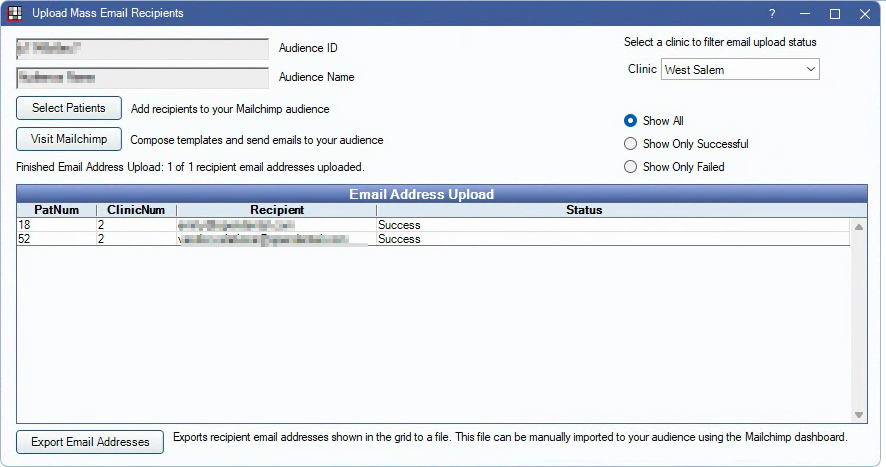
This window is only visible when Mass Email is enabled in the eServices Signup Portal.
Informational Fields:
- Audience ID: Displays the audience ID as entered in Mass Email Mailchimp Setup.
- Audience Name: Displays the audience ID as entered in Mass Email Mailchimp Setup.
Clinic: Select the clinic to send emails from.
Select Patients: Click to select a list of patients to upload to Mailchimp. See Advertising - Select Patients.
Visit Mailchimp: Click to open the Mailchimp interface. Drafting and sending email campaigns, audience management, campaign analytics, and more are handled through the Mailchimp interface.
Filters:
- Show All: Display all email addresses regardless of status.
- Show Only Successful: Display email addresses that have been successfully uploaded to Mailchimp.
- Show Only Failed: Display email addresses that did not upload to Mailchimp.
Email Address Upload Status Grid: Displays the email address and status of the last created set of uploaded patients.
- PatNum: The patient's patnum.
- ClinicNum: The clinic number assigned to the patient.
- Recipient: The email address of the patient.
- Status: Displays the status of the upload.
Export Email Addresses: Export email addresses to a separate file. This file can then be used to manually import patient email addresses to Mailchimp.
Emails sent to patients are commlogged on patient accounts.