


Change Healthcare E-Claims
Change Healthcare (formerly Emdeon) is an e-claims clearinghouse.
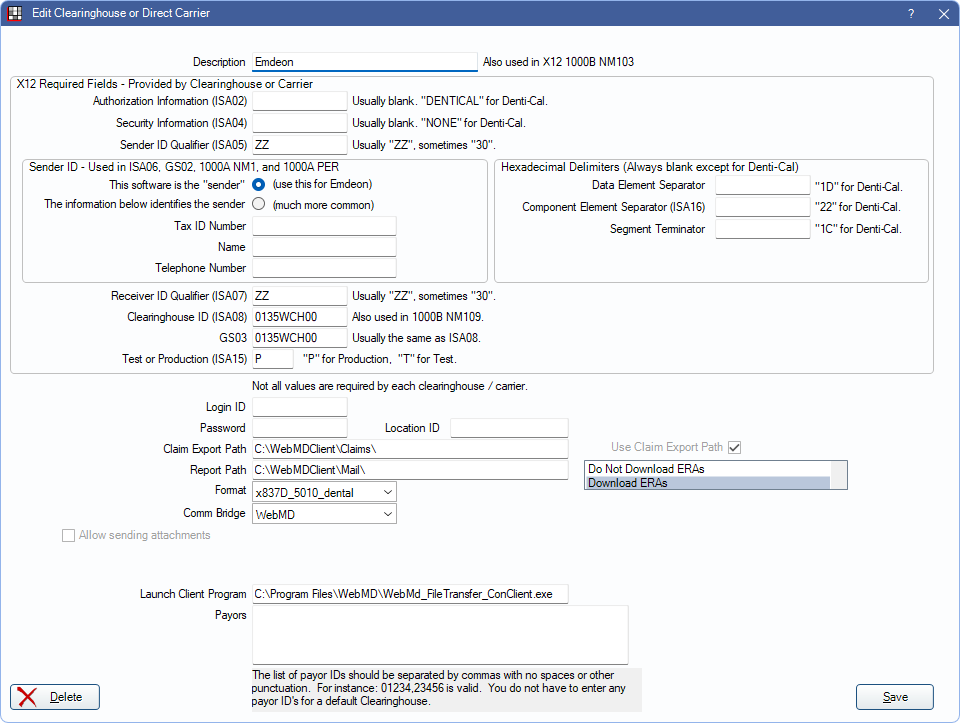
In Clearinghouses, double-click Emdeon (may also display as WebMD).
Change Healthcare is not a recommended clearinghouse solution. It appears Change Healthcare has stopped providing clearinghouse services after a cyber attack that took place in early 2024.
New Change Healthcare Registrations
Offices wishing to use Change Healthcare can register using the steps below.
- Call Open Dental Support. We will provide a Change Healthcare Login ID and a Password.
- Fill out a registration form and email it to dentalenrollment@changehealthcare.com or fax it to 615-340-6107.
- Batch claim registration forms:
- Electronic Eligibility registration form: Registration $17.95 per provider per month (PDF) Note: If already signed up for batch claims and electronic eligibility is desired, fill out the Electronic Eligibility form and send to Change Healthcare to complete the enrollment. If not signed up for claims, sign up for both simultaneously.
- Download and run WebMD Eclaims Setup.exe on the workstations where claims will be sent from.
- Set the Change Healthcare client program to always run as administrator. The program location is indicated in the Launch Client Program field on the Edit Clearinghouse window.
- Download and save WebMd_FileTransfer_ConClient.zip.
- Right-click the zip file and select Open with..., then select File Explorer.
- Copy the three files, then paste them into C:\Program Files (x86)\WebMD.
- A Replace or Skip files window appears. Select Replace the files in this destination. This updates the necessary files for claim submission.
- In Open Dental, set up the Emdeon (Change Healthcare) clearinghouse using screenshot above as a reference.
Payer Enrollment Forms:
- Batch Claims: https://support.changehealthcare.com/customer-resources/enrollment-services/dental-claims-enrollment-forms
- Real Time: https://support.changehealthcare.com/customer-resources/enrollment-services/dental-real-time-enrollment-forms
- ERA: https://support.changehealthcare.com/customer-resources/enrollment-services/dental-era-enrollment-forms
- Dental ERAs cannot be automatically downloaded from Change Healthcare/Emdeon. See ERA Troubleshooting for information on manually downloading to Open Dental.
- NPI: https://www.changehealthcare.com/content/dam/change-healthcare/support/enrollment-forms/dental-enrollment-forms/Claims/npi_all.pdf
Dental Payer Lists: https://support.changehealthcare.com/customer-resources/payer-lists
Claims
After sending claims to Change Healthcare from Open Dental, the Change Healthcare Claims Manager launches automatically. Click Confirm to complete claim submission.
Electronic Eligibility
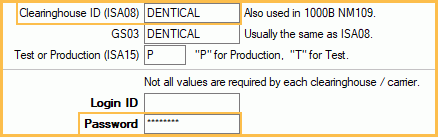
For Denti-Cal carriers, also enter the Denti-Cal password on the Denti-Cal Clearinghouse Setup window.
- In Clearinghouses, double-click Denti-Cal.
- For Clearinghouse ID (ISA08) enter DENTICAL.
- Enter the Denti-Cal password.
- Click OK.
Updating to TLS 1.2
07/24/2018: Offices already using Change Healthcare to submit electronic claims must update their installation to TLS 1.2 by November 2018. TLS 1.2 is a more secure method of sending claims. The update must happen on all workstations set up to send e-claims.
To update the Change Healthcare installation, follow steps 4 through 8 under New Change Healthcare Registrations above.