


Production and Income Reports
The Production and Income Report allows offices to view their production and income for a date range with multiple Report Type options.
In Standard Reports, in the Production and Income section, click More Options.
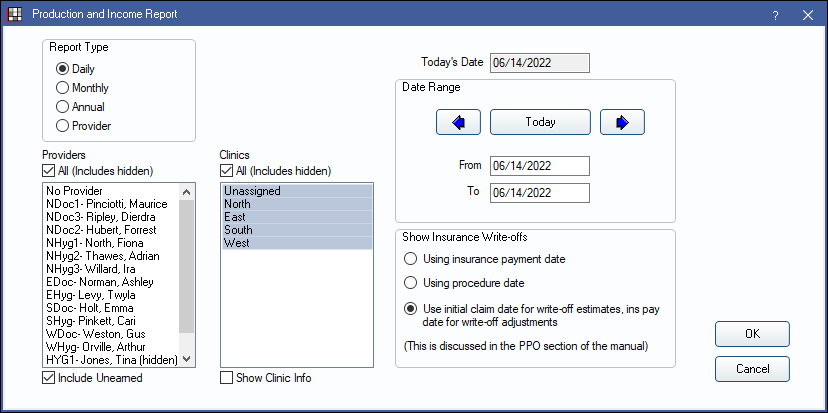
Alternatively, to run a production and income report immediately from Standard Reports, in the Production and Income section click one of the preset report options:
- Today or Yesterday generates a Daily report using default options.
- This Month or Last Month generates a Monthly report using default options.
- This Year generates an Annual report for the current year (Jan. 1 - Dec. 31) using default options.
- Large offices may want to set up a Report Server to run Production and Income Reports. This can be useful to prevent lockups and slowness in a live database.
- If using multiple databases, see Central Enterprise Management Tool ( CEMT ) for running Production and Income reports.
- Requires the Production and Income - View All Providers permission to run the report for any provider not associated with the logged-in user. Users without this permission can only run Production and Income for the provider associated with their User Edit.
- Set report defaults that affect this and other reports in Report Setup: Misc Settings.
Report Options
Report Type: Select the report type. Date range values automatically change to match. There are several Production and Income reports. Each summarizes information differently based on report type.
- Daily: Lists detailed information on transactions including payments, procedures, and adjustments, for a single date or date range.
- Monthly: Lists production and income totals by day, for a date range. Also shows scheduled production.
- Annual: Lists production and income totals by month, for a date range.
- Provider: Lists production and income totals by provider, for a date range.
Providers: Select the providers to include, or check All (Includes hidden) to include all providers, including providers marked Hidden On Reports that have activity (i.e., production or income) for the report period.
- Selecting No Provider includes payments with an unearned type (pay splits not associated to a provider, such as prepayments).
- Provider selection is only an option if the logged-on user has the Production and Income, View All Providers permission.
- To exclude hidden providers from the report, manually select visible providers from the list.
Include Unearned: Select this box to include unearned income. An additional column is added for Unearned Income on Monthly, Annual, and Provider report types. The report uses a landscape orientation. This should either always be selected when running Production and Income or never selected.
Clinics: Select the clinics to include, or check All (Includes hidden) to include all clinics. Clinic is determined by the clinic of the procedure (place of service).
- Show Clinic Info: Only an option for the Daily Report Type. Set the default in Report Setup: Misc Settings.
Checked: The clinic shows for each transaction, clinic totals show at the bottom of the report, and the report prints in landscape orientation.
Unchecked: Clinic information does not show. - Show Clinic Breakdown: Select how data is grouped. Set the default in Report Setup: Misc Settings.
- Checked: Report groups by clinic.
- Unchecked: Report groups by date and intermingles clinics.
Date Range: Select the report date range. Today's Date is automatically populated with the current date for reference. The default date range is based on the report type. To change, manually enter the From / To dates, or click the arrows to quickly change values.
- Today/This Month/This Year: Reset dates to match the current day, month, or year.
- Right/Left arrows: Move back or forward one day/month/year at a time.
Show Insurance Write-offs: Select when to apply insurance write-offs to production amounts. See Show Insurance Write-offs for more details. Set the default in Report Setup: Misc Settings.
- Using insurance payment date: Apply the write-off when the insurance payment is entered.
- Using procedure date: Apply the write-off on the date of service.
- Use initial claim date for write-off estimates, ins pay date for write-off adjustments: Apply initial write-off estimate on the claim date. Apply any difference between write-off estimate and finalized write-off (i.e., write-off adjustments) on the insurance payment date. The report displays and prints in landscape orientation when this option is selected. See below for descriptions of each write-off column.
Report Preview
Click OK to generate a print preview of the report. For a description of Toolbar buttons, see Complex Report System.
The following screenshot is an example of the Monthly Report Type and explanation of the report columns. Columns vary depending on report settings.
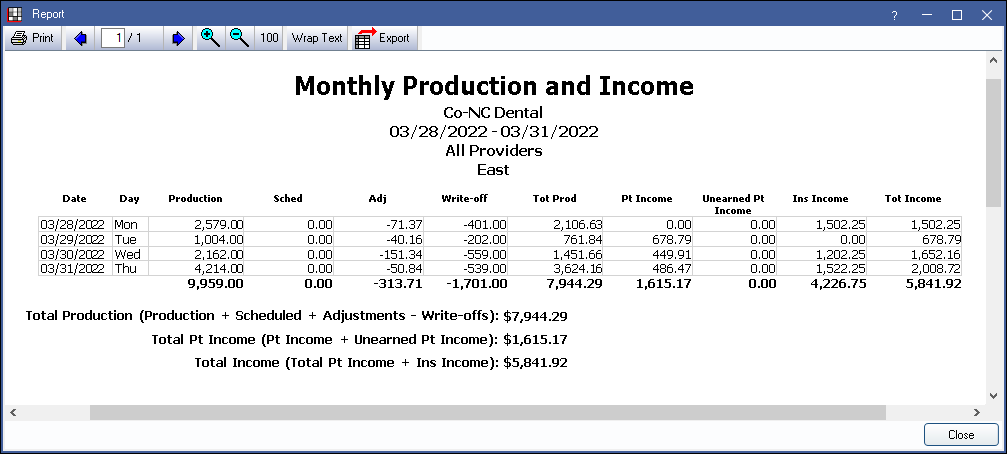
- Production: Procedure fees for completed procedures (i.e., the gross fee billed to the patient). Production from Capitation ( HMO / DMO ) Insurance Plan is not included.
- Sched: Only displayed when using the Monthly Report Type. Sum of treatment planned procedures fees attached to appointments with a status of scheduled. Does not include work for Capitation insurance plans. Write-offs are only included if Monthly P&I scheduled production subtracts PPO write-offs is enabled in Report Setup, Misc Settings.
- Adjustments: Adjustments attached to completed procedures or posted to accounts. (Monthly Report Type Only) Includes discounts attached to scheduled procedures.
- Write-off: Write-off amounts for PPO insurance plans. Capitation write-offs are not included.
- Column is not shown when Use initial claim date for write-off estimates, ins pay date for write-off adjustments. Alternate columns are used to display write-offs.
- The following columns display when Use initial claim date for write-off estimates, ins pay date for write-off adjustments is selected.
- Write-off Est: The write-off estimate amount in the Claim Snapshot.
- Write-off Adj: The change in write-off amounts. Write-off estimate amount (Write-off Est column) minus the actual write-off amount. Amount must be a number other than zero.
- Tot Prod: Total Production. The daily sum of Production + Sched + Adj - Write-off or Production + Sched + Adj - Write-off Est + Write-off Adj.
- Pt Income: Patient Income. The amount received from patient payments that are allocated.
- Unearned Pt Income: Unearned Patient Income. The total amount of payments with an Unearned type (typically prepayments).
- Ins Income: Insurance Income. The amount received from insurance company (claim) payments.
- Tot Income: Total Income. The daily sum of Pt Income + Ins Income.
- Total Production: The sum of all Production + Sched + Adjustments - Write-offs or Production + Sched + Adj - Write-off Est + Write-off Adj.
- Description: (Daily Report Type only) Description of the production or income (e.g. check, adjustment, discount, procedure code name, etc).
- Provider: (Daily and Provider Report Types only): Provider associated with the production or income.
- Clinic: Clinic associated with the production or income.
- While write-offs are displayed as a negative amount in the grid, that is only for visual emphasis. This does not result in negative amounts being subtracted in the production totals using the equations defined above.
- Production and income amounts may not match Aging of A/R amounts.
- Occasionally, this report may change if a patient's Treatment Plan has not been viewed. Once viewed, the report refreshes with the new discount information.
Examples
Daily Report Type
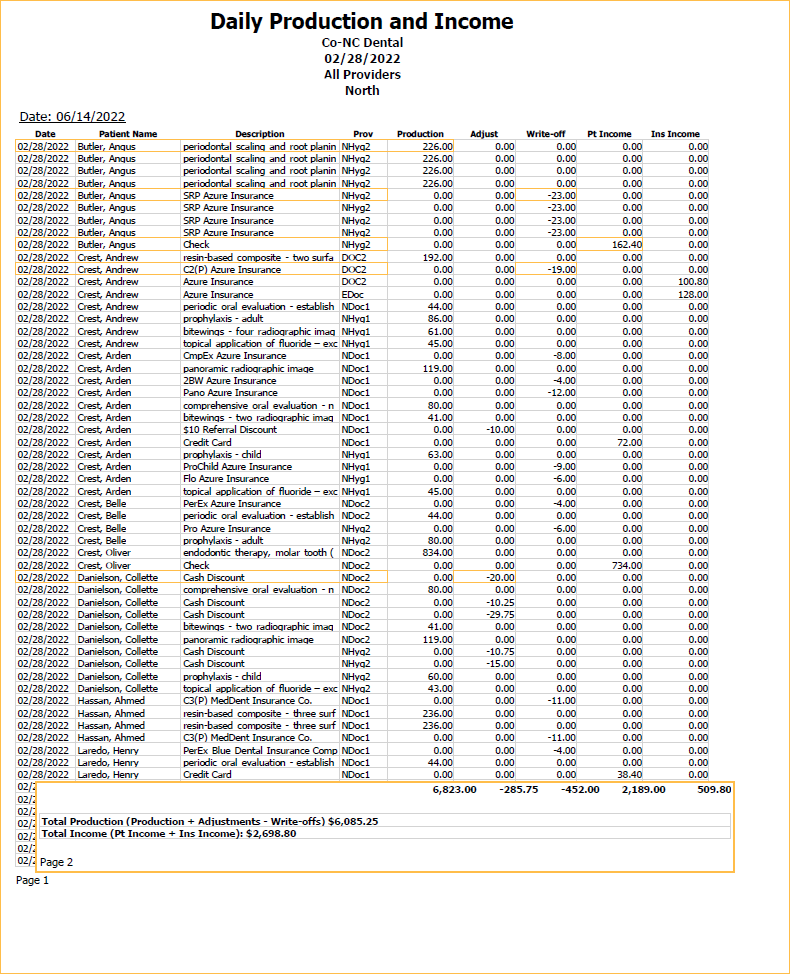
The Daily Report Type displays an itemized list of all production and income for the selected date range, provider(s), and clinic(s). Each item appears on its own line on the report. For example, an adjustment shows on a separate line on the report from the procedure production, even if the adjustment was attached to the procedure.
Columns are totaled on the last page of the report in addition to net total production and income. This report type can be run for more than a single day to show itemized history for a date range.
Monthly Report Type
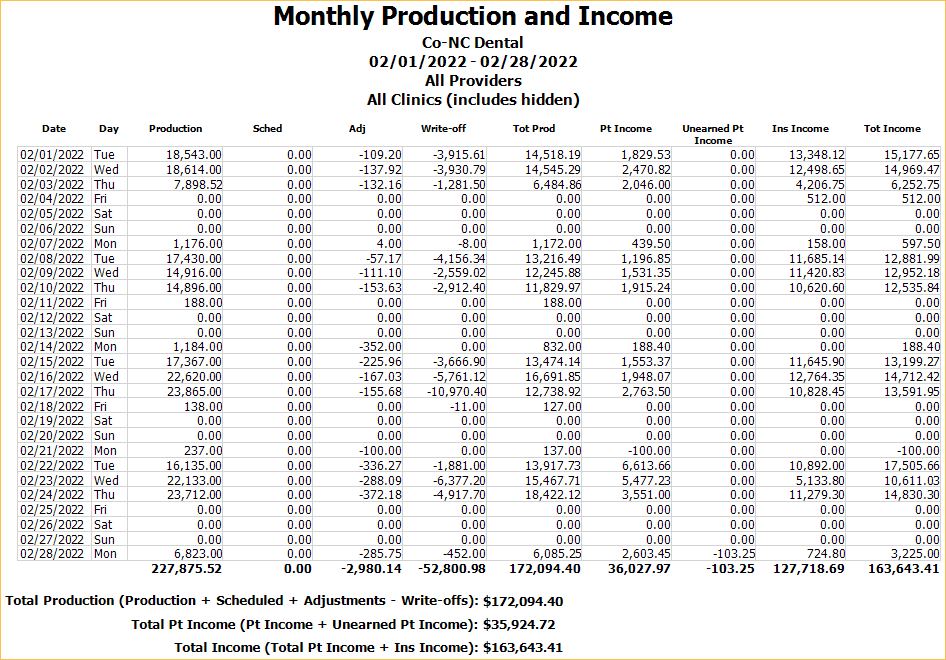
The Monthly Report Type sums up all production and income for the selected date range, provider(s), and clinic(s) and groups the totals by day. To show itemized history for a monthly date range instead, run the Daily Report Type and enter a date range for the desired month.
Columns are totaled on the last page of the report in addition to net total production and income.
Annual Report Type
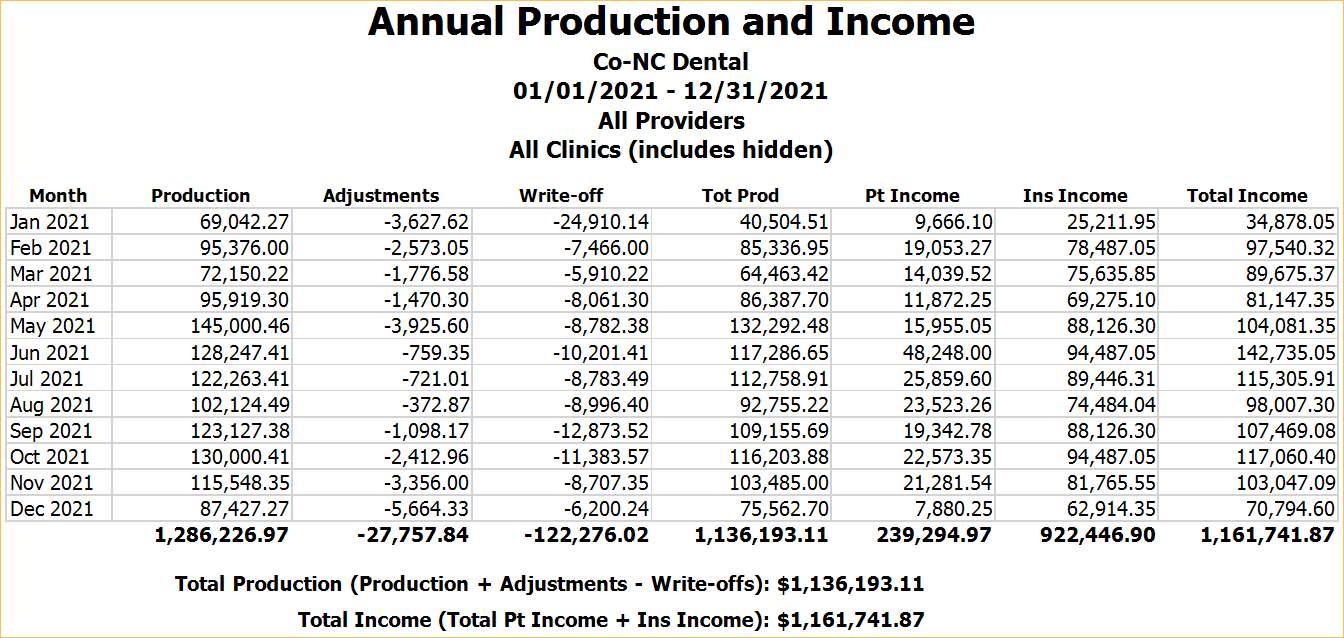
The Annual Report Type sums up all production and income for the selected date range, provider(s), and clinic(s) and groups the totals by month.
Columns are totaled on the last page of the report in addition to net total production and income.
Provider Report Type
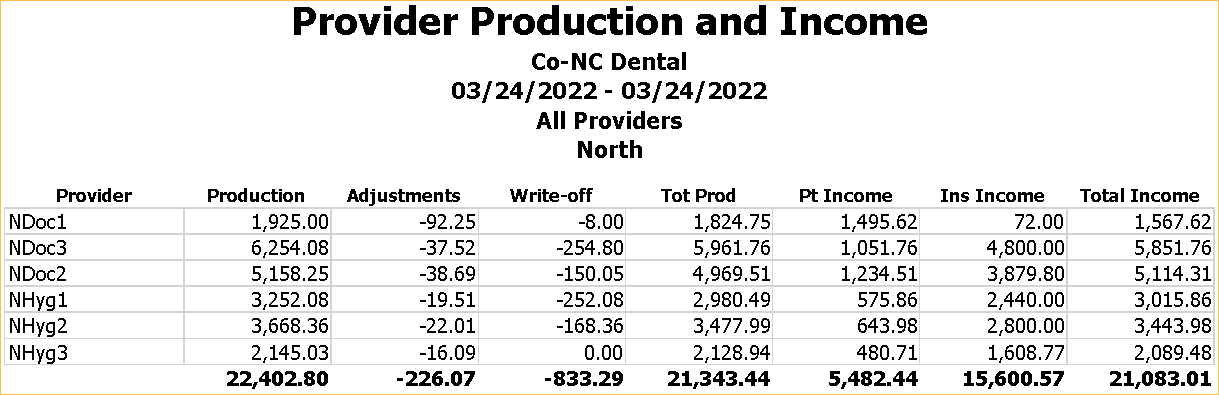
The Provider Report Type sums up all production and income for the selected date range, provider(s), and clinic(s) and groups the totals by provider.
Columns are totaled at the end of the report.