

Search
eClipboard Web Message
Send scheduled patients a link to eClipboard Web to easily fill forms and complete checklist items ahead of their appointment.
In the Appointments Module, right-click an appointment and select Send eClipboard Message.
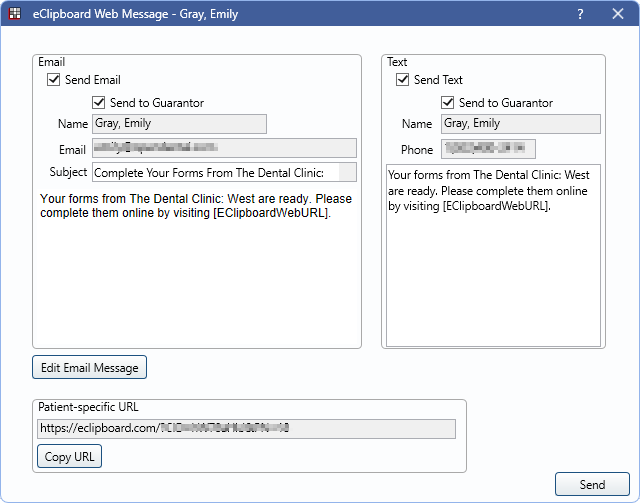
When using eClipboard Web, patients can access eClipboard without needing to download the app or check in for their appointment. See eClipboard Web: What Patient Sees.
Determine the default wording Email and Text messages in eClipboard Setup. Messages can be edited individually for a patient as needed.
- Send Email: Check to send an email to the selected patient from the default email address in Email Setup.
- Send to Guarantor: Check to send the message to the guarantor (e.g., parent or guardian) instead of the patient.
- Name: Displays the patient or guarantor name.
- Email: Displays the email to send to.
- Subject: Displays the email subject. Can be edited per patient as needed.
- Edit Email Message: The email message displays above this button. Click to open an HTML Email to edit as needed.
Text
Requires the Integrated Texting Feature. Additional per text message fees apply.
- Send Text: Check to send a text message to the selected patient.
- Send to Guarantor: Check to send the text message to the guarantor (e.g., parent or guardian) instead of the patient.
- Name: Displays the patient or guarantor name.
- Phone: Displays the phone number to send to.
- Message: Displays the default text message. Edit message per patient as needed.
Patient-specific URL
Click Copy URL to copy the URL and paste as needed. This URL is specific to the selected patient. When entered, the patient is prompted to send a verification code via text or email.
Send Message
Click Send to send an email, text, or both to the selected patient.