

Search
Insurance Pending Supplementals Report
Run the Insurance Pending Supplementals report to display pending insurance supplemental payments.
In Standard Reports, in the Lists section, click Insurance Pending Supplementals.
To control user access to this report, see Report Setup: Security Permissions.
Filters
Click Refresh to view new data as insurance overpayments and underpayments are added.
Clinics: Select specific clinics or select All (includes hidden) to include all clinics, including those marked hidden.
- Filters by clinic assigned to the claim.
- If user is restricted to specific clinics, only accessible clinics are listed. When selecting All (includes hidden), results include all clinics user has access to, including those marked hidden. Results do not include clinics user is restricted from or claims not assigned to a clinic.
Pending Supplemental Type: Limit the results by pending supplemental payment type (i.e., Overpaid, Underpaid, or All).
Pending Supplementals
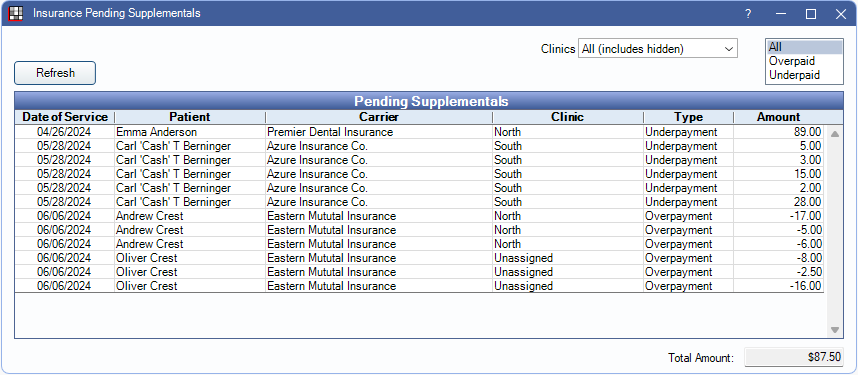
The Pending Supplementals grid displays results matching the filter criteria. Click a column title to sort results in ascending or descending order. The following is a description of each report column:
- Date of Service: Claim's date of service.
- Patient: Name of the patient associated with the claim.
- Carrier: Name of the carrier associated with the claim.
- Clinic: Only displays when the Clinics feature is enabled. Clinic assigned to the claim. This may differ from the patient's assigned clinic.
- Type: Displays whether the pending payment is an overpayment or underpayment.
- Amount: Displays pending supplemental insurance payment amount.
- Total Amount: Sum of all currently displayed pending supplemental insurance payment amounts.
Double-click a row to open the corresponding claim.
Right-click options:
- Go to Account: Select the patient and go to the Account Module.
- Copy Cell Text: Copy text in the specified cell.
- Copy Row: Copy all text in the specified row.