

Search
Production by Procedure Report
Run the Production by Procedure report to display details about procedures completed in a date range by procedure code.
In Standard Reports, in the Daily section, click Production by Procedure.
To view a breakdown of individual procedures, see the Daily Procedures Report.
To control user access to this report, see Report Setup: Security Permissions.
Filters
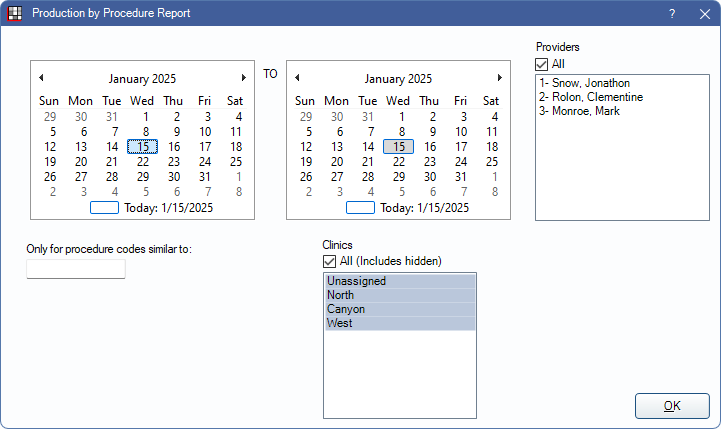
Set the report criteria and filters before running the report.
Calendar: Select the date range to include in the report using the procedure date. Select the starting date in the left calendar; select the end date in the right calendar.
Providers: Select the providers to include. Check All to include all providers, including those marked Hidden on Reports.
- Filters by treating provider (i.e., provider assigned to Procedure).
- Users without the Daily - View All Providers permission only see the provider associated with their User in the Providers list.
- Users must have the Daily - View All Providers to access the full provider list and utilize the All checkbox.
- To exclude hidden providers from the report, manually select visible providers from the list.
Only for procedure codes similar to: Filter the report so only certain procedure codes are included.
- Enter a complete procedure code (e.g., D1234) to limit the report to a single procedure code.
- Enter a partial procedure code (e.g., D12) to include all similar codes (e.g., D1234, D1245, etc)
Clinics: Select specific clinics, or check All (includes hidden) to include all patients, including those marked hidden.
- Filters by clinic assigned to procedure.
- If user is restricted to specific clinics, only accessible clinics are listed. When checking All (includes hidden), results include all clinics user has access to, including those marked hidden. Results do not include clinics user is restricted from or procedures not assigned to a clinic.
Report Preview
Click OK to generate a print preview of the report. The following is an example of the report and explanation of the report columns. For a description of toolbar buttons, see Complex Report System.

- Category: The Proc Code Category assigned to the Procedure Code.
- Code: Procedure code.
- Description: Description of the procedure code.
- Quantity: Total number of the specified procedure code set complete for the selected date range.
- Average Fee: The average fee billed for the procedure code. (Total Fees / Quantity)
- Total Fees: Sum of the total fees billed for the procedure code.