
Statements
Statements for an individual patient or family can be generated from the Account Module. Batch statements can be generated from the Manage Module, Billing tool.
In the Account Module, click Statement.
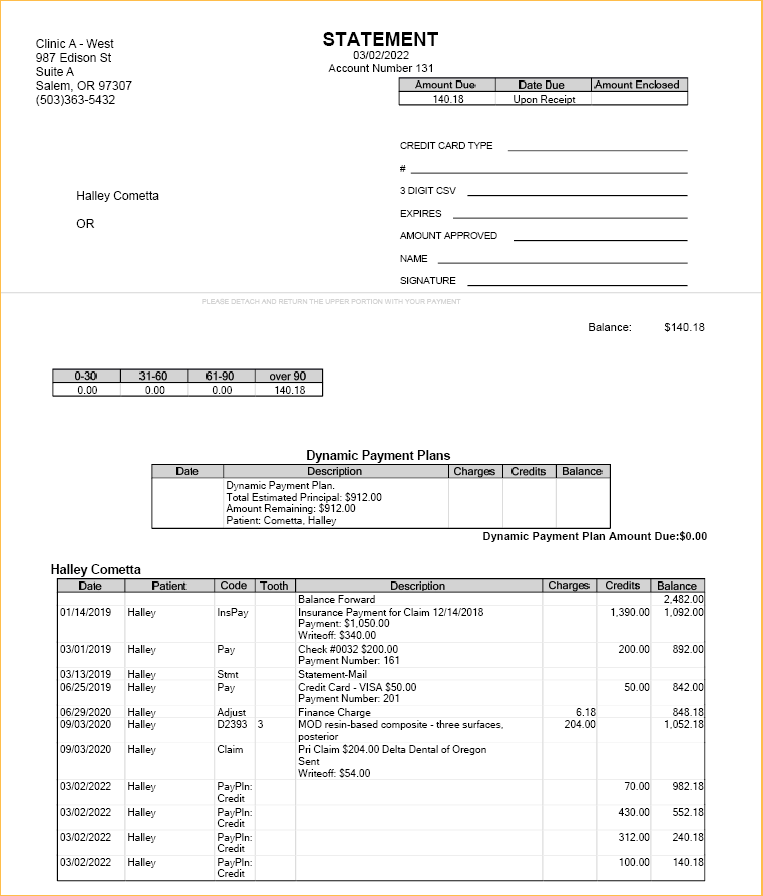
Statements use a customizable Sheets layout. Statements can be printed, emailed, or sent electronically.
Generating Statements from the Account
In the Account Module toolbar, click the Statement dropdown.

Choose from preset options to quickly generate a statement:
- Statement: Use the Statement button in the Account Module toolbar to generate a family statement using the default Billing options.
- Walkout: Generate a statement that includes procedures, payments, etc. for the current day only. Useful to give patients after an appointment.
- Email: Generate a PDF statement attached to an email. Statements can be sent securely when using the Secure Email eService.
- Receipt: Generate a statement for today's payments made by a patient.
- Invoice: Generate a statement with a unique invoice number for selected production (e.g., procedures, adjustments, etc.) or the current day's procedures. Helpful to show total charges billed without payment information.
- Limited: Generate a statement for specific transactions or procedures.
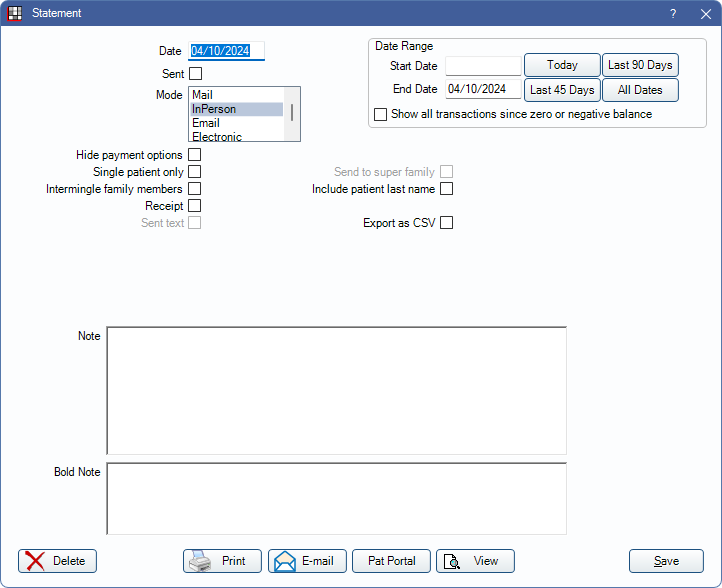
Or use More Options to customize the statement details, like date range, before generating.
Viewing Statements
Once a statement has been saved, they can be easily retrieved and viewed right from the Account Module. Statements can also optionally be saved to the Imaging Module.