

Bamboo Bridge
In the Main Menu, click Setup, Program Links, Bamboo.
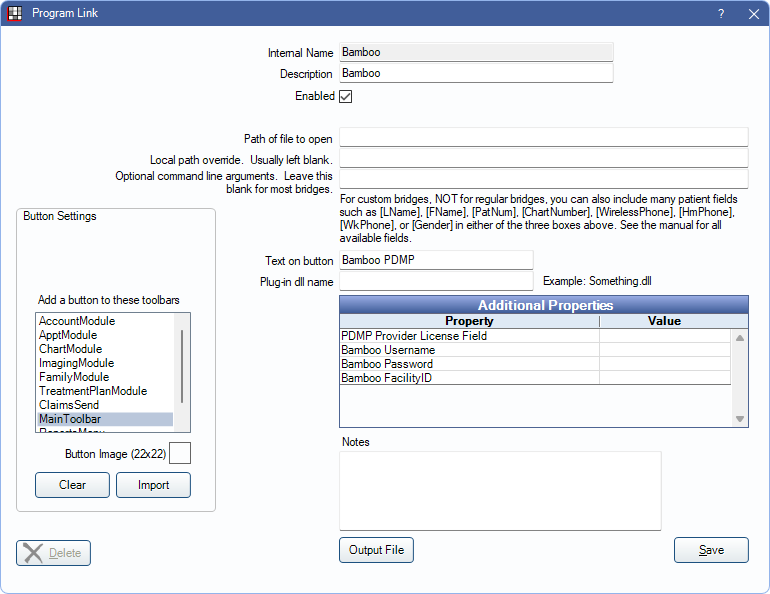
Note: Bamboo was previously known as Appriss.
The Bamboo PDMP (Prescription Drug Monitoring Program) bridge is for users outside of California, Illinois, Kentucky, Maryland, Utah, and Washington. Users in those states use the PDMP Bridge instead. Users must be on support with Open Dental to use this feature.
If not yet registered for PDMP, register here: https://go.bamboohealth.com/ehrrequest
The following must be set before using the PDMP bridge:
- Providers must have a First Name, Last Name, State License, DEA Number, and National Provider ID entered.
- Patients must have a First Name, Last Name, Birthdate, and Zip Code entered.
- The logged-on user must be associated with a provider.
- The Open Dental Service must be installed and running.
Bridge Setup
Enter the necessary settings to enable this bridge. Only the fields that need edits are displayed below.
- Enabled: Check to enable this bridge.
- Text on button: The description used on the button as it appears in the toolbar.
- Additional Properties: Enter any additional properties to launch this bridge accurately.
- PDMP Provider License Field: Enter the state license or the state Rx ID. If this field is left blank, the state license is used.
- Bamboo Username: Username as given by Bamboo.
- Bamboo Password: Password as given by Bamboo.
- Bamboo FacilityID: Practice name.
- Add a button to these toolbars: Determine which toolbars this button should display under.
- Button Image: (Optional) Import an image to show on the button (must be exactly 22 x 22 pixels).
Click Save to submit changes.