

Canada Procedure Code Tools
The Procedure Code Tool can automatically update the Procedure Codes with any missing CDA codes,or missing N codes, set Auto Codes and Procedure Buttons back to default, and remove any temporary codes (T codes) installed with the trial version.
For Canada users, in the Procedure Codes window, click Tools.
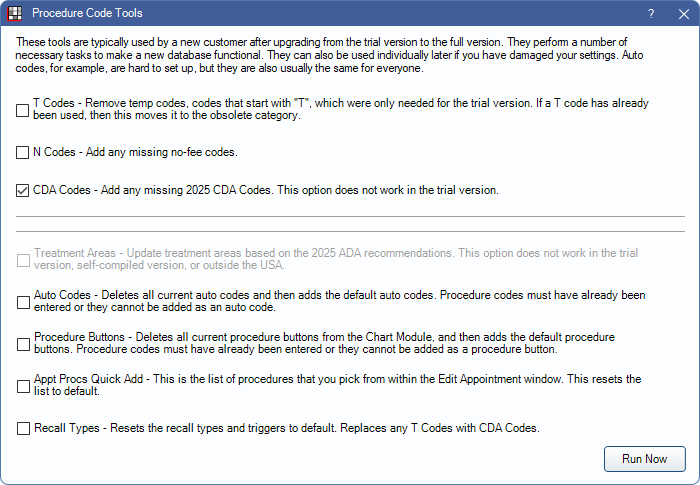
Procedure Code Tools should be run in the following situations:
- Immediately after updating to the full version from the trial version. The trial version comes with T (temp) codes instead of CDA codes. Check all boxes to remove the T codes, add missing CDA codes, and reset defaults. See Update to Full Version.
- To reset default Auto Codes, Recall Types, Procedure Buttons, and/or Appt Proc Quick Add procedures.
- To update to the latest CDA codes each calendar year.
Use caution when selecting and running tools so that customized defaults are not reset.
The "Security Admin" Permission and Procedure Code Edit Permission is required to run Procedure Code Tools.
Run Now: Click to run all selected tools. A message indicates when updates are done.
Other Codes: Click to open Other Procedure Codes to import other code systems. See Other Procedure Codes below for details.
Update Procedure Codes
- T codes: Remove all temp codes (T) that were installed with the Trial version.
- N codes: Add missing no-fee procedure codes.
- CDA Codes: Add missing CDA procedure codes.
- Some newer codes may not be available.
- This tool does not update existing codes. Contact Open Dental for possible solutions if existing codes need to be updated.
- Additional codes can be added manually as needed. See Add Procedure Code for details.
Update Procedure Code Defaults
- Treatment Areas: Not available to Canada users.
- Auto Codes: Deletes all existing Auto Codes and resets to default. Procedure buttons will be dissociated from the deleted Auto Codes.
- Code Groups: Deletes all existing Code Groups and resets to default. When checked, a prompt displays to select the code system to use.
- Procedure Buttons: Deletes all existing Procedure Buttons and resets to default.
- Appt Procs Quick Add: Deletes all existing Appt Procs Quick Adds and resets to default. Resets the list of Quick Add procedures on the Edit Appointment to default.
- Recall Types: Deletes all existing Recall Types and triggers and resets to default.
Other Procedure Codes
In the Procedure Code Tools window, click Other Codes.
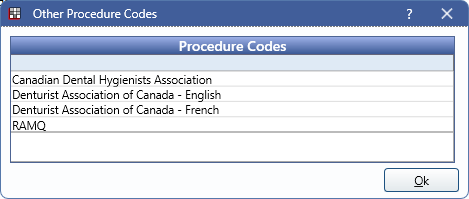
Other code systems are entered as new Proc Code Categories. Any codes that already exist are skipped. Other code systems available include:
- Canadian Dental Hygiene Association (CDHA)
- Denturist Association of Canada (in both French and English)
- RAMQ (used in Quebec). When imported, codes are appended with an R. The R is not sent on claims and used only to distinguish any possible duplicates with CDA codes.
- ACDQ (Association des chirurgiens dentistes du Québec). To import, contact Open Dental Support. Must be an ACDQ member.
- Canadian Dental Association (CDA). Only needed if using Advanced Options.
Use Advanced Options to update descriptions, abbreviations, treatment areas, and paint types. A password is required to run Advanced Options. The password is abracadabra. Advanced Options include:
- Update descriptions of existing procedure codes.
- Update abbreviations of existing procedure codes.
- Update treatment area of existing procedure codes.
- Update paint type of existing procedure codes.
To import a code system or to update advanced options, highlight the procedure code system, select any advanced options, then click Ok.