
DoseSpot eRx Allergies
DoseSpot eRx users can add allergies to a patient to get interaction warnings when creating prescriptions.
In the DoseSpot eRx / Prescription interface, on the Patient Landing Page, is the Drug Allergies area.

Relevant allergies (e.g., drug or drug-related allergies) can be entered here. These will be used to help determine possible drug/allergy interactions when creating prescriptions. Allergy information already entered for the selected patient is displayed in this area. These allergies are not synced to Open Dental. Add Patient Allergies to the Open Dental medical history as needed.
Add or Edit Allergies
In the Drug Allergies area, click Add/Edit Drug Allergies to make changes or add new allergies.

No Known Allergies: Check this box to indicate the patient has no reported allergies. This box is disabled if there are allergies entered for the patient.
Current Drug Allergies: Allergies that have already been entered for the patient are listed here. See Add/Edit a Drug Allergy on this page for details.
Add New Allergy: Click to associate a new allergy with the patient. See Add/Edit a Drug Allergy on this page for details.
Click Save to exit the allergies sidebar and submit changes.
Add/Edit a Drug Allergy
Double-click an existing allergy to edit. Click Add New Allergy to create a new one.
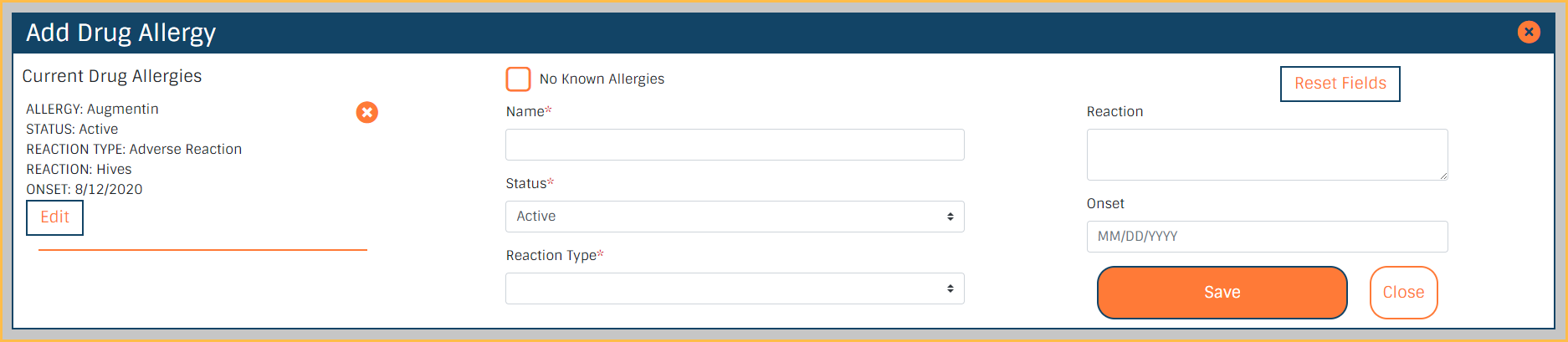
- Drug Name: For new allergies, begin typing in the search bar to find the drug to associate. For existing allergies, the name is read-only.
- Alternatively, if a result is not found, type the name manually. Manually entered allergies are not considered for interactions.
- Status: Select Active or Inactive. The default is Active.
- Onset Date: The date of the first occurrence of the allergy.
- Reaction Type: Select Allergy or Adverse Reaction.
- Reaction Description: Enter the reaction the patient gets from the drug.
To save a new allergy, click Add to Current Allergies.
To delete an existing allergy, click Remove Drug Allergy.