


Patterson Imaging Bridge
In the Main Menu, click Setup, Program Links. Double-click on Patterson Imaging from Patterson Dental Supply Inc.
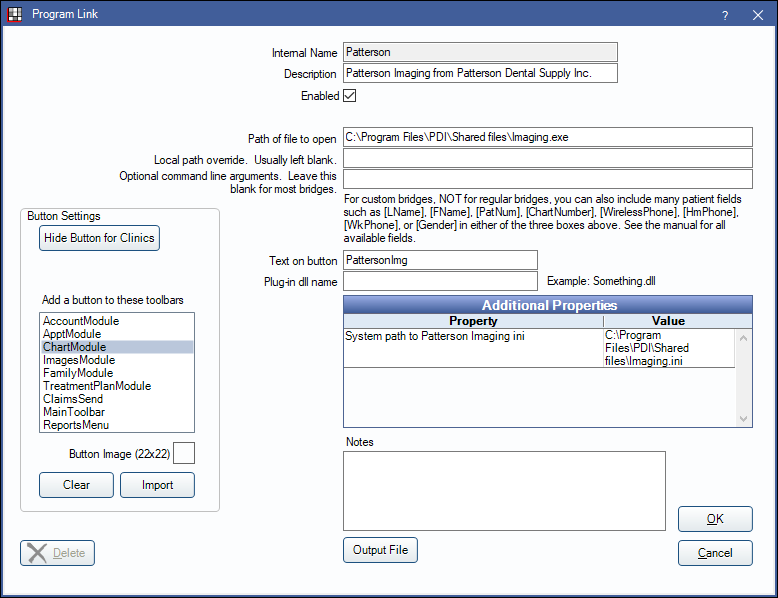
Patterson is an imaging software. Website: www.pattersondental.com. This bridge only works with Patterson Imaging version 15 or newer.
To enable the bridge:
- Check the Enabled box.
- Verify the Path of file to open.
- Double-click on Additional Properties to change settings. Enter the System path to Patterson Imaging ini.
- Set up a clickable bridge button.
- Under Add a button to these toolbars, highlight where to display the button.
- Enter the Text on button.
- (Optional) Import an image to show on the button (22 x 22 pixels).
- If using clinics, click Hide Button for Clinics. Select which clinics the button should display on.
- Click Save.
Technical Details
- The bridge matches patients based on SSN. If SSN is not present, then it matches on FirstName, LastName, BirthDate.
- If no patient is found matching those criteria, then it creates a new patient in Patterson Imaging.
- The Path of file to open can vary depending on where the exe is stored on your computer. It may be C:\Patterson Imaging\Shared Files\Imaging.exe
Patterson Imaging
We have posted information about Patterson Imaging availability because there may be fewer options for dentists moving from Patterson Eaglesoft with integrated imaging. We want our customers to know this before leaving Patterson Eaglesoft, as they may need to switch to another imaging solution if they do so.
As of 01/22/2018, we have been told that Apteryx and XDR are capable of converting the Patterson Eaglesoft Digital Integration x-rays to their digital software for a fee.
On 3/8/2017, a Patterson representative from the Patterson Technology Center told Open Dental that new Patterson Imaging licenses are no longer available for sale from Patterson and that this had been true since 2/17/2017. We contacted Patterson because multiple customers (Open Dental customers in common with Patterson) called us and told us Patterson was telling them that switching from Patterson Eaglesoft Practice Management software to Open Dental would mean they would not be able to access the images through a new Patterson Imaging installation. We were further told by Patterson that dentists may purchase an existing Patterson Imaging license from another dentist, but even then, Patterson will no longer assist in pointing Patterson Imaging at a database created with Patterson Eaglesoft Digital Integration.