


Program Links
The Program Links window lists all the program bridges that can be linked from Open Dental.
In the Main Menu, click Setup, Program Links.
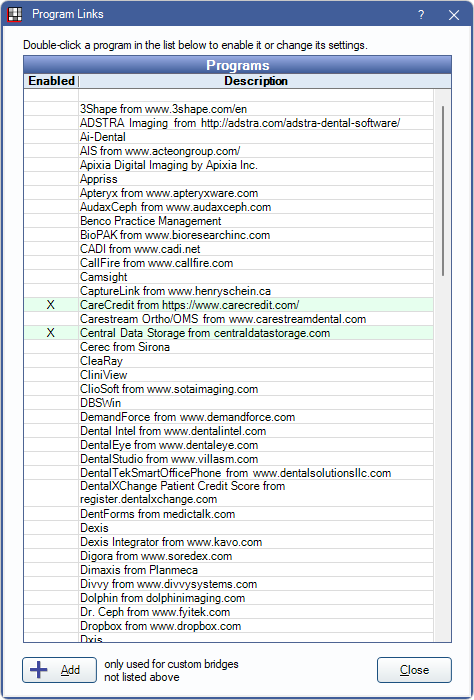
From here users can enable or disable a bridge, set up clickable toolbar buttons to access the bridge, and enter other bridge-specific information. For specific setup steps for each bridge, refer to the individual bridge page.
All supported bridges will list.
- Bridges marked X and highlighted green are currently enabled.
- If a program is not listed, it may be able to be set up as a Custom Bridge.
We recommend having a Business Associate Agreement (BAA) in place with a third-party before enabling a program link.
Program Link Settings
Double-click a bridge to enter bridge settings on the Program Link window.
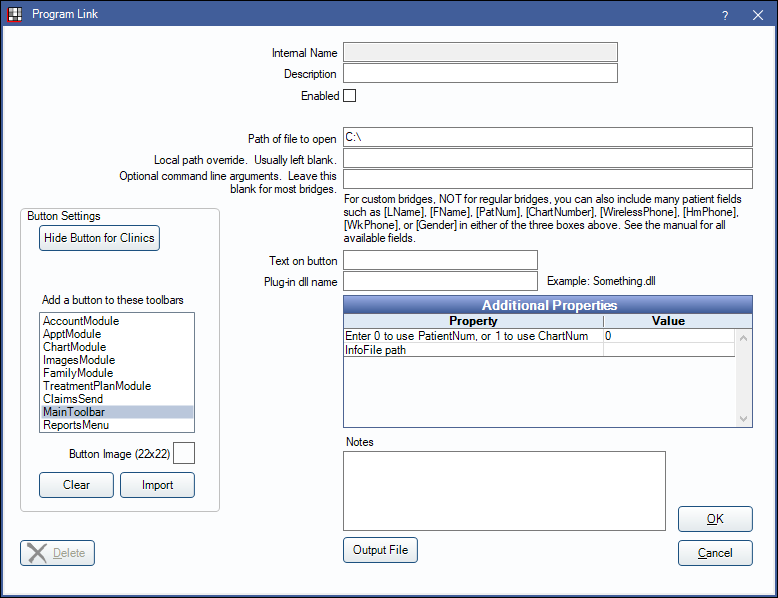
Each bridge window will auto-populate with default settings.
- Internal Name: The internal name of the bridge. Cannot be edited.
- Description: The name of the bridge as it shows in the list of program links. Can be edited.
- Enabled: Check to enable the bridge. Uncheck to disable the bridge.
- Hide unused button: This option only shows for bridges that have preset clickable buttons in Open Dental, if the bridge is disabled. Check the box to hide the button in the software.
- Path of file to open: The path to the program's executable (exe) on the computer or network. It can be a local path or a server path. This path will be used by all computers connected to the database, unless a Local path override is entered on an individual machine.
- Local Path Override: On an individual machine, enter a path to a program's executable (exe) that will override the Path of file to open. This is usually left blank.
- Optional command line arguments: If a program bridge requires a command line argument, it will be specified in the Notes area. Otherwise this is usually left blank.
- Text on Button: The text that will appear on the toolbar button.
- Plug-in dll name: See Plug-In Framework.
- Additional Properties: Set additional property values. Property values can be edited only. To change a value, double-click on a row. Enter the Value, then click OK to close.
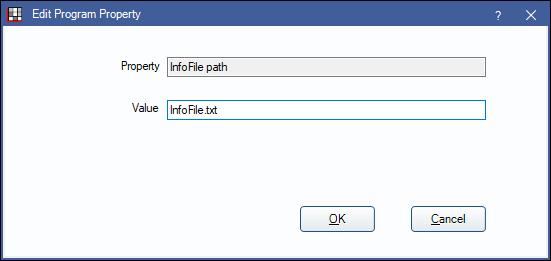
- Notes: Bridge specific instructions.
- Output File: Build an output file to custom bridges.
Button Settings
Hide Button for Clinics: If using clinics, select which clinics the bridge applies to.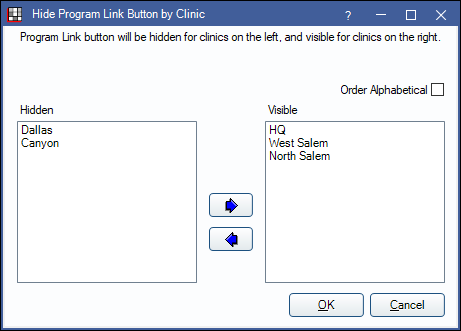
- Use the left and right arrows to move unneeded clinics to the Hidden column.
- Hidden clinics will not show the bridge button. Visible clinics will show the bridge button in the selected toolbars.
- When a clinic is hidden, the message Program Link button is not visible for some clinics. will appear in the Program Link window.
- Order Alphabetical: Check to order clinics in alphabetical order.
Add a button to these toolbars: Select one or more areas to display the bridge button.
- AccountModule: Account Module toolbar (second row).
- ApptModule: Appointments Module toolbar (second row).
- ChartModule: Chart Module toolbar (second row).
- ImagesModule: Imaging Module toolbar (second row).
- FamilyModule: Family Module toolbar (second row).
- TreatmentPlanModule: Treatment Plan Module toolbar (second row).
- ClaimsSend: Does nothing.
- Main Toolbar: Main Toolbar in every module.
- ReportsMenu: The Reports dropdown menu.
Button Image: Import an image that will show on the button. 
- Click Import to select an image file from the computer. The image must be 22x22 pixels.
- Click Clear to remove an image.
Remote Desktop Solutions
If there is a server using terminal services that users remotely connect to, consider using the Remote Executer program by MQ Technologies (http://www.mqtechnologies.com/en/home). Remote Executer passes the command to launch the software to the local computer, instead of launching the program on the server computer.
- The Path of file to open should contain the path to Remote Executer.
- Enter the path of the program to launch in the Optional command line arguments field.
Here is an example of using Remote Executer to launch Notepad.

Troubleshooting
If a bridge to an imaging program is not behaving well, first start Open Dental by running as an admin. The administrator privileges will then be inherited by the bridge program. If this works, set Open Dental to always run as admin:
- Locate the Open Dental program file (usually C:\Program Files (x86)\Open Dental\OpenDental.exe)
- Alternatively, to only run Open Dental as admin when launched from a specific shortcut, locate the shortcut instead.
- Right-click the file and select Properties.
- Go to the Compatibility tab and check Run this program as an administrator.