


CamSight Bridge
In the Main Menu, click Setup, Program Links. Double-click on Camsight.
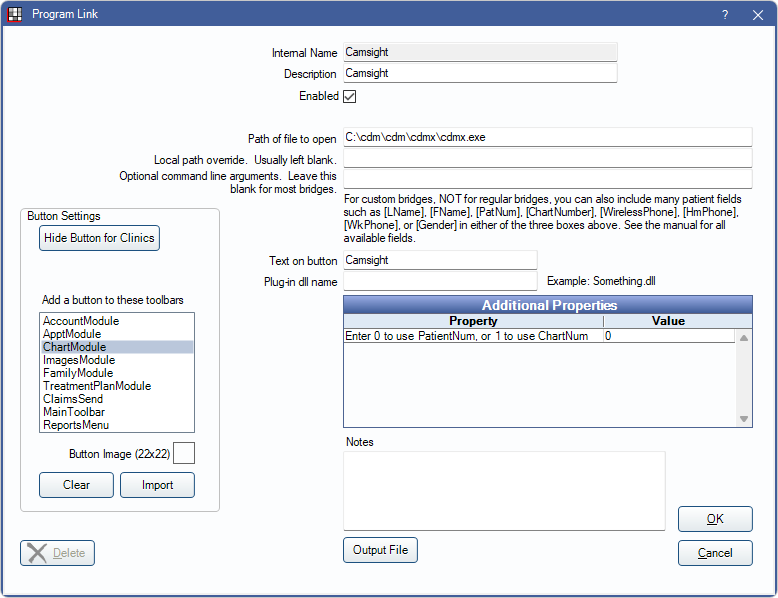
Camsight is a digital imaging software. This bridge is also used for Denttio. Website: http://denttio.com/.
To enable the bridge:
- Check the Enabled box.
- Verify the Path of file to open.
- Double-click on a row in Additional Properties to change settings. Use the PatNum (enter 0) or ChartNum (enter 1) as the patient ID.
- Set up a clickable bridge button.
- Under Add a button to these toolbars, highlight where to display the button.
- Enter the Text on button.
- (Optional) Import an image to show on the button (22 x 22 pixels).
- If using clinics, click Hide Button for Clinics. Select which clinics the button should display on.
- Click Save.
Technical Details
Camsight uses the patient number to identify selected patients. Open Dental sends the patient's birthdate, chart number (if selected), name, patient number, and SSN to Camsight. If the patient does not exist, a new patient record is created.
If patients already exist in Camsight make sure the numbers match Open Dental prior to using the bridge. To change the patient numbers to match both softwares, either use chart numbers and edit the chart number in Open Dental to match Camsight or edit the patient ID in Camsight to match Open Dental.