


Dolphin Bridge
In the Main Menu, click Setup, Program Links. Double-click on Dolphin from dolphinimaging.com.
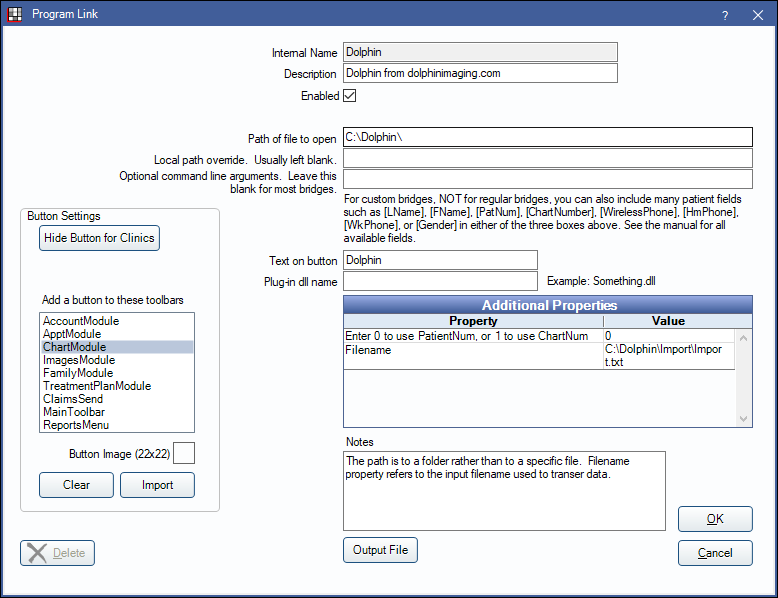
Dolphin is imaging software. Website: https://www.dolphinimaging.com/.
To enable the bridge:
- Check the Enabled box.
- Verify the Path of file to open.
- Double-click on a row in Additional Properties to change settings.
- Use the PatNum (enter 0) or ChartNum (enter 1) as the patient ID.
- Verify the path for Filename.
- Set up a clickable bridge button.
- Under Add a button to these toolbars, highlight where to display the button.
- Enter the Text on button.
- (Optional) Import an image to show on the button (22 x 22 pixels).
- If using clinics, click Hide Button for Clinics. Select which clinics the button should display on.
- Click Save.
Technical Details
The bridge uses two programs:
- C:\Dolphin\dolDb.exe Passes information to Dolphin using the specified file. Text is written to a file, and then Dolphin imports it.
- C:\Dolphin\dolCtrl.exe Launches Dolphin using the specified patient id.
Everything is based on patient IDs. All changes to patient data are made from within Open Dental, and then kept automatically synchronized based on patient ID. The only time that synchronization is performed is when using the bridge to launch a patient in Dolphin. Open Dental never deletes patients from Dolphin.