


Recall
Customize a patient's recall interval, change the prophy recall to perio, delete/disable a patient's recall type, or add custom types from the Recall grid.
In the Family Module, double-click the Recall grid.

A patient's recall appointments are determined by their Recall Types. Every patient is assigned a prophy recall but can be set to perio as needed and other custom types may be added. When a recall types' trigger procedures are set complete, the patient's next recall appointment due date is calculated. The recall due date, along with the scheduled date, recall status, and recall notes for each of a patient's recall type show in the Recall grid.
 Also see our Recall Videos Playlist
Recalls for Patient
Double-click the grid to edit recalls for the current patient.
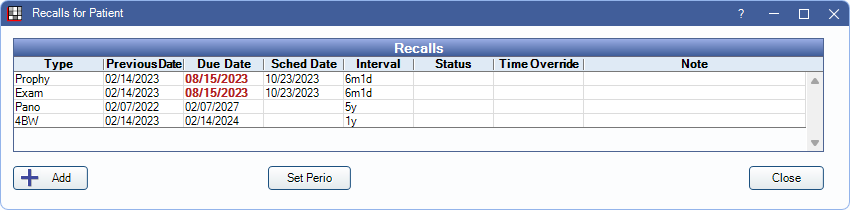
Recalls: Lists the patient's recall types assigned to the patient along with date information. Every time a recall appointment is set complete, the dates, status, and notes reset. Double-click a type to view additional information or edit. Opens the Edit Recall window (see below).
Add: Click to manually attach a recall to the patient. Opens the Edit Recall window (see below). This is rare as, recalls are generally added automatically when trigger procedures, set up in Recall Types, are set complete.
Set Perio/Set Prophy: The button changes depending on if the patient is currently assigned a prophy or perio recall type. If currently assigned a prophy recall type, click Set Perio to replace the prophy recall with the perio recall type. Due dates are updated to reflect the perio interval. To change back to prophy, click Set Prophy.
Edit Recall
Click Add to attach a new Recall Type or double-click an existing recall type to edit.
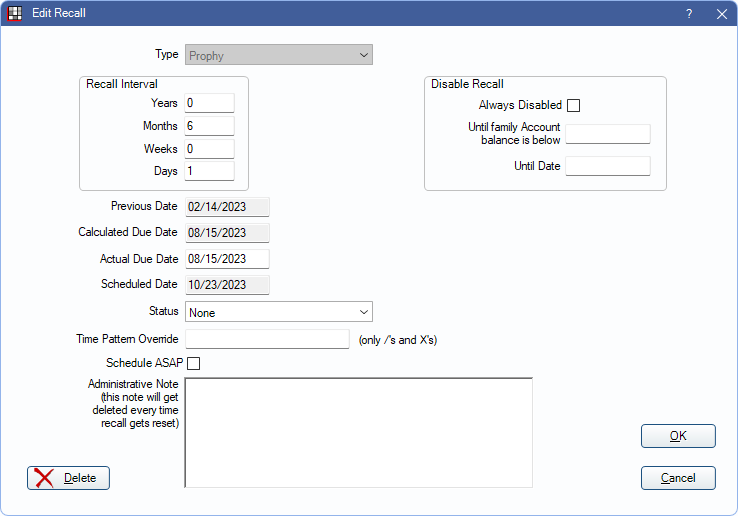
- Type: The currently selected recall type. This field is read-only on existing recalls. For new recalls, select the Recall Type to attach to the patient.
- Recall Interval: Automatically populates the default interval set for this recall type. To change for this patient only, enter a new value in one of the fields. To change for all patients, edit in Recall Types.
- Previous Date: The date of the patient's last recall appointment for this recall type. This is based on the completed procedures that trigger the recall or the insurance history.
- Calculated Due Date: The recall due date based on the Previous Date plus the recall interval.
- Actual Due Date: Typically the same as the Calculated Due Date but may be changed. When the same, syncing recall types updates this date but if different, syncing does not update this date.
- Schedule Date: The date of the scheduled recall appointment (if scheduled). Appointment must contain a recall trigger procedure.
- Time Pattern Override: Create a custom time pattern when scheduling this patient for recall appointments. This pattern overrides the pattern defined in the Recall Type. Time Pattern Overrides display in the note box from the Family Module.
- Status: The current communication status of this recall with the patient. Updating the status should typically be done through the Recall List as manually setting the status from the Edit Recall window does not update the number of reminders sent. Use the dropdown to select a new status. The status is reset to None when the recall appointment is set complete. Status options are customized in Definitions: Recall / Unsched Status.
- Schedule ASAP: Check to indicate the patient would like to be contacted as soon as an opening becomes available. The appointment is added to the ASAP List.
- Administrative Note: Add notes about this patient's recall. Notes may also be added through the recall list. When the recall appointment is set complete, the note is removed. Right-Click the text box for additional options.
Disable Recall
Disable a patient's recall from the Edit Recall window. The patient is removed from the Recall List.
- Always Disabled: Check to disable recall for this patient until the box is unchecked. The recall dates, status, and note are saved but the due date is removed.
- Until family Account balance is below: Temporarily disables the recall type for the patient until the family balance is below the amount entered.
- Until Date: Temporarily disables the recall type for the patient until the date entered.
Delete: Remove a recall, that is not Prophy or Perio and does not have a Previous Date.
- If the recall is Prophy or Perio or has a Previous Date the Status, Administrative Note, and Disable Recall parameters, regardless of patient status (i.e., Patient, Inactive, etc), are reset. Check Always Disabled instead.
- When the status in Edit Patient Information is anything other than Patient, recall is automatically disabled. If the status is changed back to Patient, recall is automatically re-enabled.
- When Allow disabled recalls is enabled for Web Sched Existing Patient, patients with disabled recalls can still be allowed to schedule a recall appointment via Web Sched.