


Add Family
This is a quick way to add multiple patients for a single family at once.
In Select Patient, click Add Many.
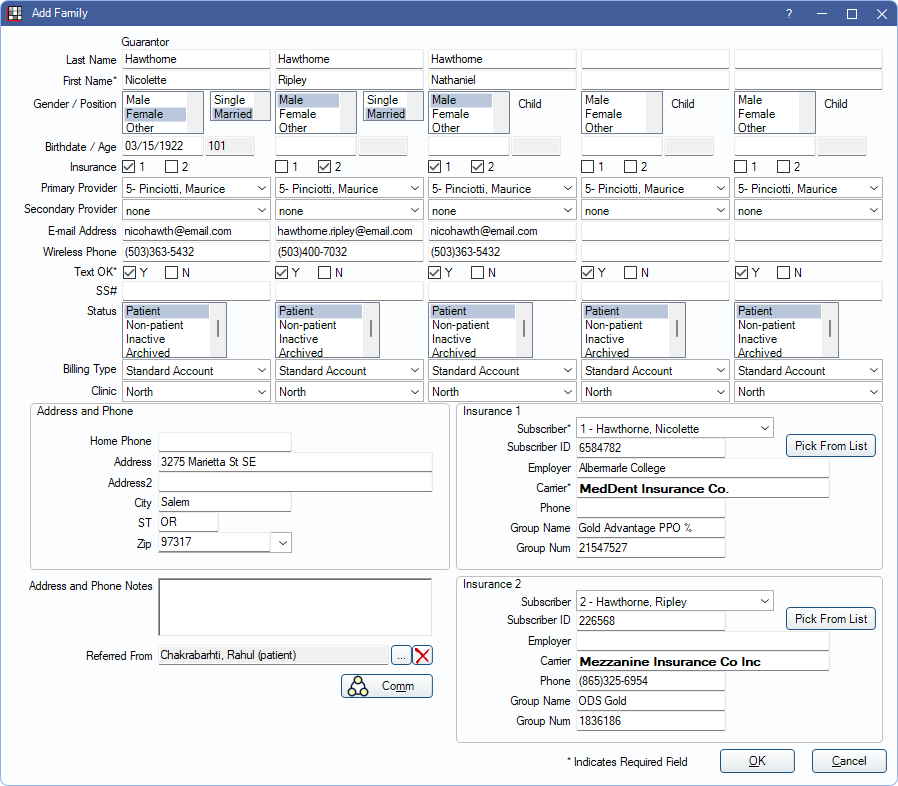
- Do not use this window to add new family members to an existing family. Instead add additional family members in the Family Module.
- Prompt staff to complete certain fields using Required Fields marked with an *.
Each family member is represented by an information column (last name, first name, gender/position, birthdate/age, etc.) The last three columns are designated for children. If there are more than five family members, add additional members in the Family Module. The guarantor is the person who is responsible for the account. To reduce data entry, some guarantor information is automatically populated for other family members.
If adding a patient that matches an existing patient with the same first name, last name, and date of birth users receive a warning before continuing.
Fields in this window match most fields in the Edit Patient Information. Below are details specific to this window:
- Last Name/First Name: Once the guarantor's last name is entered, the same last name is automatically populated for other family members as their first names are entered.
- Insurance 1, 2: If Insurance 1 and/or 2 information is entered below, indicate which plans apply to each family member. Guarantor selections affect other family members but can be changed individually.
- Primary Provider: Select the provider who will usually see the patient. If using clinics and providers are restricted to clinics, only providers available for the patient's assigned clinic are options. To change, user must have the Patient Primary Provider Edit security permission. Guarantor selections affect other family members but can be changed individually.
- Secondary Provider: The patient's default secondary provider. Normally a hygienist. If using clinics and providers are restricted to clinics, only providers available for the patient's assigned clinic are options. Guarantor selections affect other family members but can be changed individually.
- Email Address: Enter an email address for each patient. When Autofill patient's email with the guarantor's when adding many new patients is enabled in Preferences, entering the guarantor's email address pre-fills the email for all family members.
- Wireless Phone: Enter mobile phone number. Entering for the guarantor pre-fills for all members but can be changed individually.
- Text OK: Indicate if patient can receive text messages. Guarantor selections affect other family members but can be changed individually.
- Billing Type: Choose a billing type from the dropdown. Guarantor selections affect other family members but can be changed individually.
- Referred From: Enter a referral for the family. Referrer is added to each family member.
- Comm: Enter a Commlog to add to each family member's Progress Notes.
- Insurance 1/2: If the family is covered by insurance, enter plan information for up to two insurance plans. First, enter Subscriber information, (select the Subscriber from the dropdown and enter Subscriber ID). There are two options to enter plan information:
- Click Pick from List to choose from existing Insurance Plans.
- If entering a brand new insurance plan, enter the plan information into the Insurance 1/2 area. After exiting the Add Family window, add additional insurance information from Edit Insurance Plan in the Family Module.
- To enter initial plan information, the logged-in user must have the Insurance Plan Edit permission. If they do not, they can only use Pick From List.