


CC Recurring Charges
Use the Credit Card Recurring Charges Tool to process credit/debit cards or ACH payments for patients who have recurring charges (e.g., payment plans, repeating charges).
In the Main Menu, click Tools, CC Recurring Charges.
Run the tool automatically at a scheduled time each day, or manually as needed.
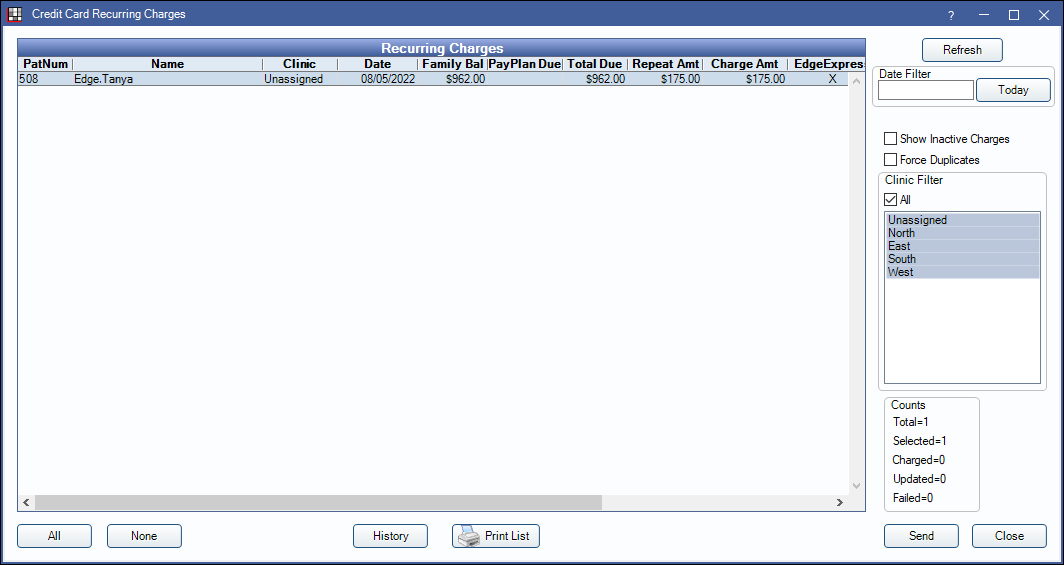
The Recurring Charges grid lists patients with a payment scheduled in the last 30 days but not yet processed. Double-click a row to go to that patient's account. This window can be left open to make it easy to view each patient's account.
PatNum: Patient account number.
Name: Patient last name, first name.
Clinic: The clinic assigned to the credit card token.
Date: Scheduled Recurring Charge date.
Family Bal: Total remaining balance for the family after subtracting pending insurance amounts.
PayPlan Due: Outstanding payment plan charges due (only shows if the payment plan is attached to a Recurring Charge).
Total Due: Total family balance and payment plan charges due.
Repeat Amt: Authorized recurring charge amount.
Charge Amt: Amount that will be charged.
When multiple payment processing programs are enabled, each account in the list indicates the program the card or bank account the Token was created for and will use the indicated program to process the payment. If a single credit card has a token for more than one processing program and authorized Recurring Charges, the Recurring Charges Tool will determine the program to use to process the payment in this order; XCharge, PayConnect, and then PaySimple.
X-Charge: X indicates the credit card token has been saved to X-Charge.
EdgeExpress: X indicates the credit card token has been saved to EdgeExpress.
PayConnect: X indicates the credit card token has been saved to PayConnect.
Pay Simple: X indicates the credit card/ACH token has been saved to PaySimple.
IsActive: X indicates the credit card is enabled for Recurring Charges.
Edit the Date / Clinic Filter and click Refresh to limit or expand the number of patients in the Recurring Charges grid.
Date Filter: Filter the list by patients with a recurring charge date that is on or after the entered date.
Clinic Filter: Check All or select one or more clinics to filter the list by. Clinics are determined by the clinic associated with the credit card token.
Show Inactive Charges: Determines whether cards not set as Is Recurring Active display in the list. See Authorize Recurring Charges. Set whether this option is enabled or disabled in Preferences, Recurring charges show inactive charges by default.
Force Duplicates: Uncheck to prevent more than one charge for the same amount to the same card in a day. Check to allow multiple charges. Useful if multiple family members use the same card for Recurring Charges or when a patient has made a payment for other services with the same card today.
The Counts section shows the Recurring Charge progress.
Total: The total amount of Recurring Charges ready to be run.
Selected: The number of charges that are currently selected for processing.
Charged: The number of charges successfully processed during the most recent run. Patients with successful charges will be removed from the list.
Updated: (For the XCharge Decline Minimizer feature only) The number of credit cards updated by the Decline Minimizer, see XCharge (OpenEdge) below.
Failed: The number of charges that failed to process during the most recent run. When a payment declines, a matching transaction for $0.00, with a note that indicates the decline, will show in the patient's account ledger. Patients with failed charges will remain in the list until the authorized charge is cleared from the Credit Card Manage, their account balance is zero, or a payment is applied to their Recurring Charge.
All: Click to select all patients in the list.
None: Click to deselect all patients in the list.
History: Click to see the Recurring Charges history. See Recurring Charge History.
Print List: Prints the Recurring Charges grid.
Send: Click to process credit card and ACH payments for the selected patients using the credit card processing program indicated.
- Successful payment transactions are allocated to outstanding charges within the family using first in/first out logic (FIFO).
- Declined transactions create a $0 payment in the patient's account and in the payment plan (if attached) with the declined pay note.
- If Automatically inactivate declined cards is enabled in Preferences, declined cards will automatically be inactivated for future Recurring Charges. Cards can be manually set back to active in the Credit Card Edit window.
Setup Requirements
Before using the Recurring Charges feature, the following needs to be set up:
- Enable Credit Card Payment with XCharge (OpenEdge), Edge Express, PayConnect Window, or PaySimple and store patient's payment information using tokens.
- Enable the practice's preferred Recurring Charges Preferences (i.e., provider allocation, payment transaction date, automatic run time, etc).
- Payment allocation is determined by Allocations Setup.
- For Enterprise users, this can also be set using the Paysplit Allocation preference.
- Determine how Recurring Charge payments (and all patient payments) are allocated to production, see Enforce Valid Paysplits in Preferences.
- Assign the default payment type for credit card Recurring Charge payments in Preferences. ACH Recurring Charges will use the type assigned in the Payment Type ACH dropdown of the PaySimple Setup window. A payment type may also be set per patient when authorizing a Recurring Charge.
- Authorize charges for select patients with a Old Payment Plan or Repeating Charges. See Authorize Recurring Charges.
Automatic Recurring Charges
One option is to run Recurring Charges automatically at a specific time each day.
- Ensure the computer with the OpenDentalService (typically the server) is on at the scheduled run times, and the OpenDentalServiceConfig.xml is configured to the correct database. Open Dental does not need to be running but the computer must be on for the service to work.
- In Preferences, enable Recurring charges run automatically.
- Set the Recurring charges run time.
- If using X-Charge, X-Web must be enabled with a XWeb ID, Auth Key and Terminal ID entered to use Automatic Recurring Charges.
- Be aware that failed charges will continue to run daily until successful, or manually stopped.
Every day run the repeating charges tool before the aging and Recurring Charges run time (when using the repeating charge feature). Once recurring charges have finished, open the Credit Card Recurring Charges window to take care of the declined payments.
Manually Run the CC Recurring Charges Tool
The other option is to manually run Recurring Charges with the Recurring Charge Tool. Choose a standard day, such as the 1st or 15th of every month to run the tool. If the Recurring Charge frequency varies with patients, run the tool daily to be sure patient balances are up to date.
- Run the repeating charges tool (only if using the repeating charge feature).
- If billing is normally done at the same time, Generate the Billing List.
- Generate the Credit Card Recurring Charges list.
- Select the charges to process. Click All to select all outstanding Recurring Charges.
- Click Send to process ACH or credit card payments for the selected patients.
- Once finished, take care of the declined payments if needed.
Apply Manual Payment to Recurring Charges
If a patient made a payment before the CC Recurring Charges tool was run, check the Apply to Recurring Charge box in the Payment window to manually apply the payment to a scheduled recurring charge (i.e., currently appears in the Recurring Charges Tool list) to prevent the patient's credit card from being charged when the tool is run. See Recurring Charge section in Payment page for more information.
Printing Receipts
There are a few options to print receipts when Recurring Charges have finished; statement receipts, credit card/ACH receipts, or Statements.
To print statement receipts or credit card/ACH receipts:
- In the Credit Card Recurring Charges window, click History.
- Right-click a patient in the Recurring Charges list and select Go To Account.
- Then print/email a statement receipt. See Receipt.
Or double-click the Recurring Charge payment and click Print Receipt or E-Mail Receipt in the Payment window. This will generate a receipt from the processing merchant.
To print statements reflecting the Recurring Charge payment, generate the billing list prior to running Recurring Charges. Once charges have posted, send statements.
Troubleshooting
Some patients with authorized Recurring Charges are not showing in the list. Why?
There are many reasons a patient might not appear in the list. Some of these reasons are:
- Patient's balance is zero.
- The authorized charge is associated to a payment plan that has been paid off.
- A payment has been applied to the scheduled Recurring Charge. Check the most recent payments in the patient's account. If the Apply to Recurring Charge box is checked in the payment window, the Recurring Charge is not needed for this month.
- Another user may be processing the Recurring Charge. Check the Recurring Charge history for pending transactions. To remove a patient from the pending status, right-click and delete the pending charge. The patient will be put back into the Recurring Charge list.
- Check to make sure the scheduled payment date is on or after the date entered in the Date Filter.
- If a payment plan (that has an amount due) is added to an existing Recurring Charge that has processed this month, the payment plan will not be charged for the current month. The patient will appear in the list on the next Recurring Charge date for the previous month's pay plan due amount plus the new month's due amounts.
- The logged-on user does not have access to the clinic assigned to the credit card token when a payment plan is attached or the patient's assigned clinic (if no payment plan is attached).
The payment date is different than the date the payment was processed. Why?
If the tool is run on a date other than the patient's authorized Recurring Charge date, the payment date is determined by the following:
- If the preferenceRecurring charges use transaction date is enabled, the Payment date will be date the charge is run.
- If Recurring charges use transaction date is disabled, the Payment date will be backdated to the scheduled Recurring Charge date, unless there is a Security Lock Date in place to prevent it.
The Payment Entry date will always reflect the actual date the charge was made.
I haven't seen any charges go through. Why?
There are two places to check to see if charges go through. The first is the Recurring Charge History. The second is in the Open Dental logger folder for Recurring Charges which is located on the computer with the Open Dental Service running (generally the server) at C:\Program Files (x86)\Open Dental\OpenDentalService\Logger\.
If these have no data, the OpenDentalService may actually not be running. This can be checked by checking in Services in Windows and ensuring OpenDentService is actively running.
I get a warning that payments cannot be processed due to a global lock date. What do I do?
When the preference Recurring charges use transaction date is disabled, the Recurring Charges Tool backdates payments to the date a charge was scheduled to process. If this date is past the Global Lock Date, Open Dental skips the recurring charge. If running the tool manually, you will get a message noting any charges that cannot be processed.
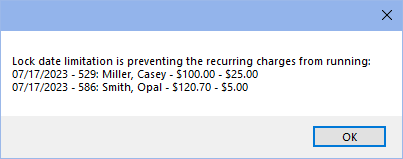
Process payments manually using the Apply Manual Payment steps above. The payment date will revert to the scheduled charge date again. Manually update the date to a date that does not conflict with the Global Lock Date (e.g., today's date).