

Global Payments V1 Setup
Enable the Global Payments V2 program link to process payments in Open Dental using Global Payments.
In the Main Menu, click Setup, Program Links. Double-click on Global Payments from www.globalpaymentsintegrated.com.
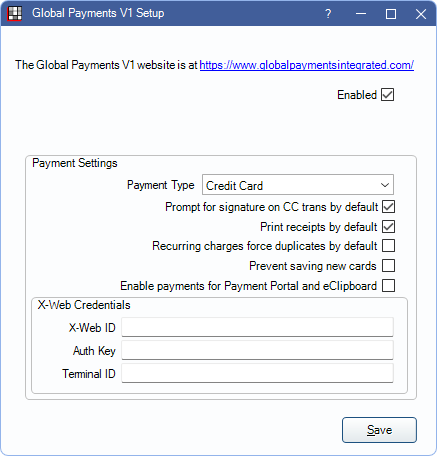
Previously this Program Link was labeled EdgeExpress from www.globalpaymentsintegrated.com.
See Global Payments V1 Transaction for information on processing payments.
Getting Started
- Before completing setup in Open Dental, contact Global Payments to sign up.
- Global Payments provides numerous setup options, including Global Payments V2 and XCharge (not normally used for new users).
- Only one version of a Global Payments Program Link (i.e., Global Payments V1, Global Payments V2, or XCharge) can be enabled at a time.
- Open Dental Cloud users must utilize Global Payments V1 setup.
- See Global Payments Integration or contact Global Payments for additional information.
Setup
Enabled: Check to enable Global Payments.
Clinic: If using Clinics, select the clinic the Payment Settings apply to.
Payment Settings
Determine Global Payment settings.
- Payment Type: Select the default Payment Type for Global Payment transactions.
- If the Preference, Payments prompt for Payment Type, is enabled, users must manually select a payment type.
- Prompt for signature on CC trans by default: Check to prompt patients for a signature on the credit card terminal before completing transactions. The terminal must support electronic signatures.
- Print receipts by default: Check to automatically print a Global Payments receipt to the default receipt Printer when a transaction is completed.
- Recurring charges force duplicates by default: By default, transactions for the same amount charged to the same card on the same day are declined. This is to prevent accidentally charging a card twice. Check to allow duplicate charges. Useful if family members have recurring charges set up on the same card for the same day.
- Prevent saving new cards: Uncheck to allow users to process new transactions or save new payment information to a patient's account in Open Dental. Check to prevent users from processing new transactions or saving new payment information in Open Dental. This does not affect payments processed through the Payment Portal Feature.
- To set whether or not new cards are saved to a patient's account after each transaction, see Preferences, Automatically store credit card tokens.
- Enable payments for Payment Portal and eClipboard: Check to allow patient payments via Payment Portal and eClipboard.
X-Web Credentials
Enter the X-Web settings provided by Global Payments:
- Enter the XWebID (12 digits).
- Enter the Auth Key (32 digits).
- Enter the Terminal ID (8 digits).