


Setup Recall
Set up recall reminder messages, reminder intervals, and the Recall List default options.
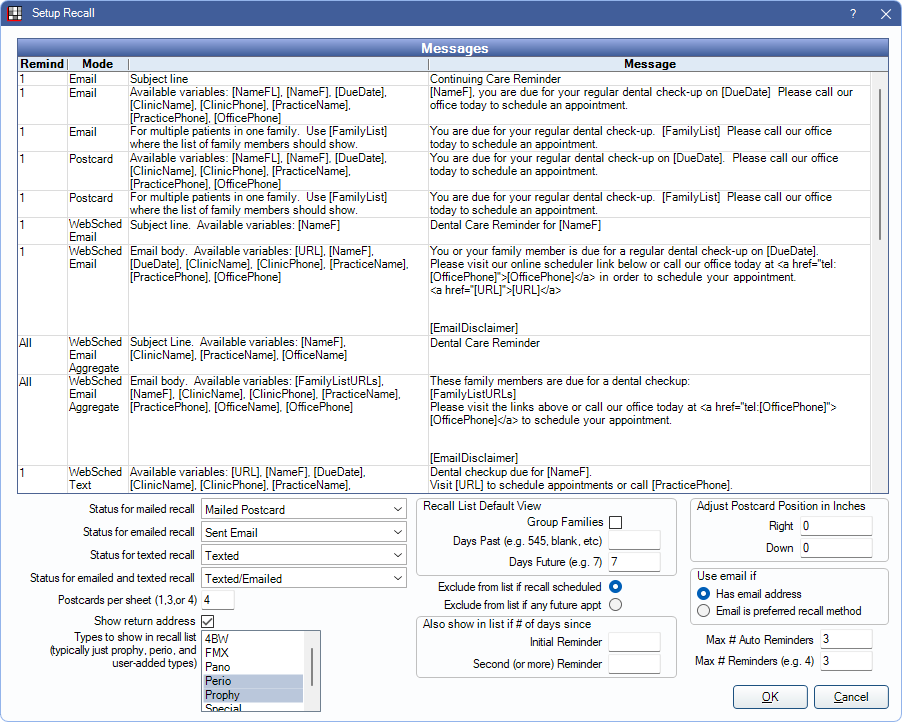
In the Main Menu, click Setup, Appointments, Recall.
Messages
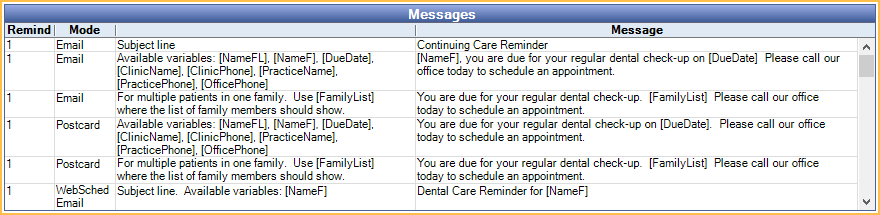
The Messages grid lists the email subject and body, postcard, and text message for recall reminders sent from the Recall List.
Language: Select a Language from the dropdown to edit the message sent for patients with the selected Preferred Language.
- Available languages are determined by Languages used by patients set up in Language Definitions.
- If the message template is blank for a language, the default (first in the list) language template is used.
- If the language for a patient is set to None or Declined to Specify in Edit Patient Information, the default language template is used.
Messages grid: Settings reflect the currently selected language.
- Remind: The reminder number (first reminder, second reminder, etc.) The message corresponds with the reminder number the patient is on. All is used on aggregated messages (i.e., family messages). If sending more than three reminders, the third reminder template is used for all subsequent reminders.
- Mode: When the message is used based on the method of delivery (Email, Postcard, WebSched Email, WebSched Text). Web Sched Aggregate Modes are automatically used when when multiple patients sharing the same email address or phone number (e.g., a family) are sent a Web Sched Recall reminder. Recall information is aggregated into a single message for the family (rather than one message for each individual family member).
- Third column: General guidance about the message and its use.
- Message: The message text. A text message segment is 160 characters. Each additional message segment results in additional charges.
- A carriage return (i.e., line break) adds two characters.
- The following characters are allowed. If other characters are used the message fails.
a-z, A-Z, 0-9, . , : ; ! ? ( ) ~ = + - _ \ / @ $ # & %
To change the email subject line or email, postcard, and text message for a Remind#, double-click the Message for the corresponding Remind# and Mode. Enter the subject or message text and insert variables as needed (see below). Click Save to keep changes.
- Message types that support HTML formatting open the HTML Email editor. Raw HTML is not supported for Recall messages.
- Postcard messages have a limit of 465 characters. Characters exceeding the limit are omitted from the printed postcard.
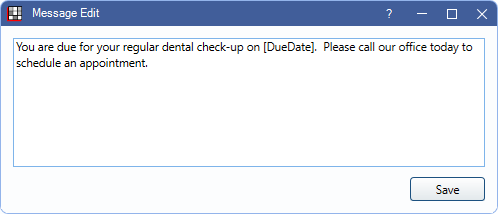
Variables are the text with brackets which pull information directly from the database. For example, the message might look like this: "John, you are due for your regular dental check-up on 11/12/2022."
Available variables:
- [NameF]: Patient first name only.
- [FamilyList]: List first name and recall due date of all family members (if Group Families is selected).
- [DueDate]: Date the recall is due.
- [URL]: (Web Sched only) The unique link the patient clicks to schedule their appointment.
- [ClinicName]: Clinic name (patient's default clinic).
- [ClinicPhone]: Clinic phone number.
- [FamilyListURLs]: (Web Sched Only) The unique links for an aggregated message (i.e., family) to schedule appointments.
- [PracticeName]: Practice name.
- [PracticePhone]: Practice phone.
- [OfficePhone]: Uses clinic phone number if available, otherwise inserts practice phone.
Recall Status Options
The status options determine which recall status is automatically applied when a recall reminder is sent. Customize options in Definitions: Recall / Unsched Status.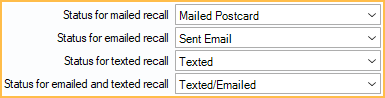
- Status for mailed recall: The status applied when a recall postcard is printed.
- Status for emailed recall: The status applied when a recall reminder is emailed.
- Status for texted recall: The status applied when a recall reminder is sent via text message using Web Sched Recall.
- Status for emailed and texted recall: The status applied when a recall reminder is emailed and texted using Web Sched Recall.
Recall List Defaults
The following options affect what shows in the recall list by default. For offices using the feature, these settings also affect which patients receive automated Web Sched Recall reminders.
Types to show in recall list: Highlight the Recall Types to send recall reminders for. To highlight multiple types, click and drag or press ctrl while clicking each type. The prophy type covers both adult and child prophies.
Select the Recall List Default View filter and sort options.
- Group Families: Determines the default setting of the Group Families box. When checked, family members are grouped together in the recall list. Web Sched Recall reminders are sent using aggregate messages to the family guarantor, regardless of whether the guarantor is due or not.
- Days Past: Determines the default From Date of the Recall List. More patients appear on the recall list the further back this time frame is set. If using Web Sched Recall, this cannot be blank.
- Days Future: Determines the default To Date of the Recall List. Leave blank to include all future recalls. This value may be left blank for Web Sched Recall.
Select one of the exclude options to exclude certain patients from the recall list.
- Exclude from list if recall scheduled: Do not include patients who have a scheduled recall appointment.
- Exclude from list if any future appt: Do not include patients who have any scheduled appointment.
Set the reminder intervals to Also show in list if # of days since the patient's last reminder. Each patient first shows up on the list when they are due for recall. Once a reminder (Recall Commlog type) is sent, they disappear from the list until they are due for their next reminder.
- Initial Reminder: The number of days from the first reminder until the second reminder is triggered (e.g., 90 days from first reminder). This cannot be zero if using Web Sched Recall.
- Second (or more) Reminder: The number of days from the second reminder until the third and subsequent reminders are triggered (e.g., 182 days from the second reminder). This cannot be zero if using Web Sched Recall.
Max # of Auto Reminders: Maximum number of automated Web Sched Recall reminders that can be sent.
Max # of Reminders: Maximum number of reminders before a patient is removed from the list. Leave the box empty to set no maximum. Counts only reminders sent after the Initial Reminder (i.e., Second (or more) Reminders). The Initial Reminder is sent in addition.
Reminder Postcard Options
Select the postcard print options (also affects printing of Confirmation List postcards).
- Postcards per sheet (1, 3, or 4): The number of postcards that print per page.
- Show return address: Check the box to print the Practice return address.
- Adjust Postcard Position in Inches: Change the offset when printing.
Reminder Email Options
Select when an email reminder is sent (also affects confirmation list email and automated Web Sched Recall reminders).
- Has Email Address: Email is the default contact method when a patient has an email address entered (Edit Patient Information) and no other preferred method is selected for recall.
- Email is preferred contact method: Email will be a patient's default Contact method only when Email is the preferred confirmation or recall method.