


ASAP List
The ASAP List shows patients who would like to be contacted when an earlier appointment becomes available.
In Appointment Lists, click ASAP.
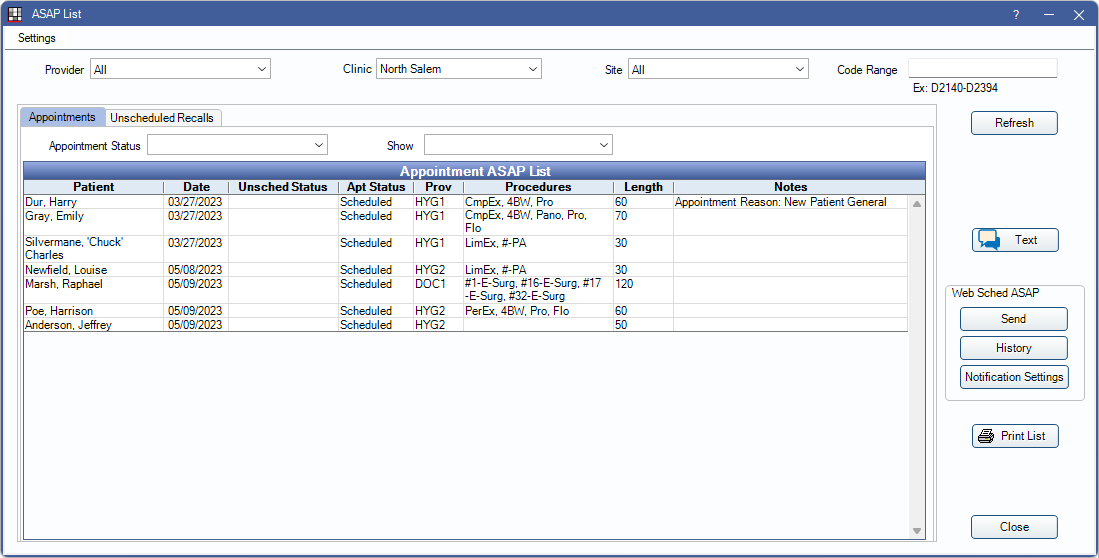
The ASAP List can remain open while other areas of Open Dental are open. Use the list to identify patients and quickly notify them about available openings. Appointments can also be scheduled from here.
 See our video: ASAP List.
- Web Sched ASAP: Send ASAP messages about available openings and allow patients to reschedule online.
- Integrated Texting Feature: Send text messages about ASAP openings.
Double-click an appointment to view appointment details. Right-click an appointment to view quick options:
- Select Patient: Open the patient's record with the current module active.
- See Chart: Open the patient's record with the Chart Module active.
- Send to Pinboard: Send the appointment to the Pinboard for scheduling.
- Remove from ASAP: Remove the appointment's ASAP status, thus removing it from the ASAP List.
There are four ways to place a patient on the ASAP List:
- Mark a scheduled appointment as ASAP. See Edit Appointment.
- Mark a Planned Appointment as ASAP. See Planned Appointments.
- Mark an Unscheduled Appointment as ASAP. In the Unscheduled List, double-click the appointment to mark it as ASAP.
- Mark Recall for a patient as ASAP. See Recall or Recall List.
Settings
To narrow results on the Appointments or Unscheduled Recalls tab, select other filter criteria then click Refresh to update.
- Provider: Only view appointments for a specific Provider.
- Clinic: Only view appointments for a specific Clinic.
- Site: Only view appointments for a specific site. See Site List.
- Code Range: Only view appointments with specified procedure codes attached.
Text: Only available when Integrated Texting is enabled. See Send an ASAP Text Message below.
Web Sched ASAP Sign up/ Send / History:
- Sign up: Sign up for Web Sched ASAP and/or Integrated Texting Feature. See eServices Signup. Once Web Sched ASAP is turned on, Send/History buttons are displayed instead.
- Send: Send is only an option when the ASAP List is accessed by right-clicking on an available time slot in the Appointment schedule and selecting Text ASAP List. See Web Sched ASAP.
- History: View Web Sched ASAP History.
Print List: Print the list of the open tab (Appointments or Unscheduled Recalls).
Appointments Tab
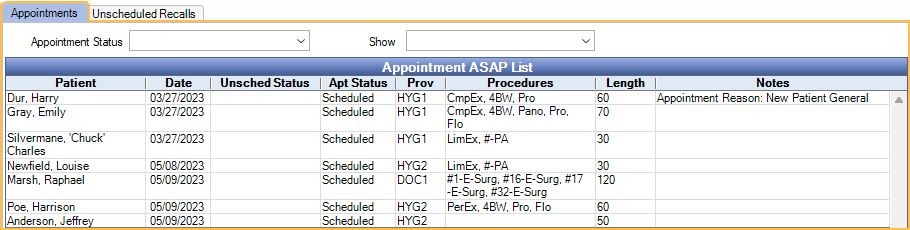
By default, the Appointments tab opens. This lists scheduled, unscheduled, planned, and broken appointments that have been marked ASAP.
- Appointment status: Only view appointments with selected appointment status.
- Show: Filter the list by:
- All Appointments: Display all appointments regardless of procedure or appointment type.
- Non-Hygiene Appointments: Display only appointments not marked Is Hygiene. See Edit Appointment.
- Hygiene Appointments: Display only appointments marked Is Hygiene.
Unscheduled Recalls Tab
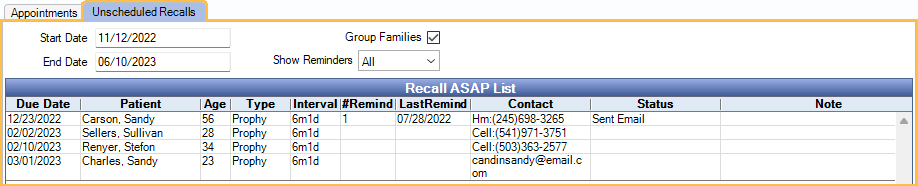
Click the Unscheduled Recalls tab to view patients with a recall marked Schedule ASAP on the Edit Recall window, even if they have received a recall reminder already.
- Start / End Date: Determines which appointments are listed based on recall due date. Defaults to the current week.
- Group Families: Group members within a family together. Defaults to the setting in Setup Recall.
- Show Reminders: Only list patients with a specific number of recall reminders.
Send an ASAP Text Message
To enable this option, sign up for Integrated Texting.
- (Optional) In the ASAP List, highlight the patient(s) to send a text message. Note: If patients are selected before clicking Text, only the selected patients are texted. If patients are not selected first, all patients with a wireless number are auto-selected.
- Click Text.
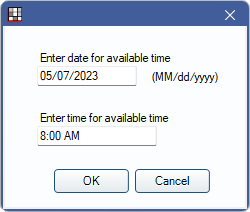
- Enter the date and time available to schedule the appointment, then click OK.
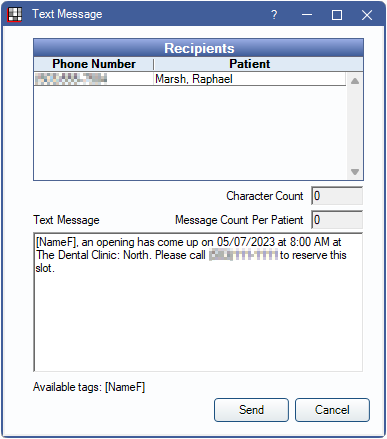
- Review the text message and modify if needed. The default text message is the Text Manual message. See ASAP Message Setup.
- Click Send. A commlog is added to each patient's account.