


Show Features
Some features can be hidden or displayed based on the preference of the practice.
In the Main Menu, click Setup, Advanced Setup, Show Features.
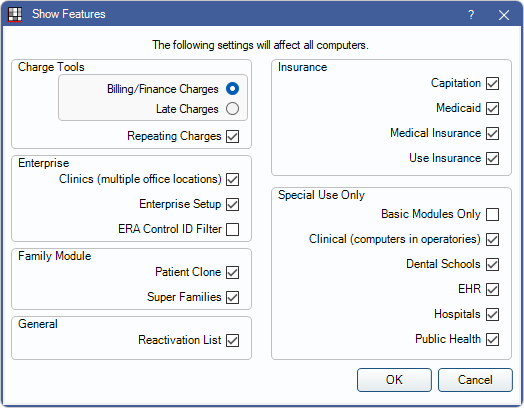
Settings here will affect all computers using the same database.
Check a feature to turn it on. Uncheck a feature to turn it off. Click OK to save settings.
Charge Tools: Determine which tools are enabled that may create charges on patient accounts.
- Only one of the following tools may be enabled:
- Billing/Finance Charges: Enable Billing/Finance Charges. Use to charge late fees on balances aged over 30, 60, or 90 days past due.
- Late Charges: Enable Late Charges. Use to charge late fees on unpaid balances billed out on statements sent in a specific time frame.
- Repeating Charges: Enable Repeating Charges.
Enterprise: These settings pertain specifically to enterprise users.
- Clinics: Turn on Clinics (i.e., when there are multiple locations).
- A password is required to enable or disable Clinics in order to prevent accidental changes. The password is abracadabra.
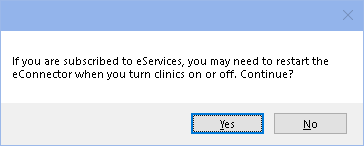
- If Clinics is turned off while using eServices, the following prompt will appear. Click Yes to continue. After turning Clinics on or off, restart the eConnector and review the Signup Portal.
- Enterprise Setup: Check to show Enterprise categories in Preferences.
- ERA Control ID Filter: Allows ERA window to be filtered by Control ID.
Family Module: These settings pertain specifically to the Family Module.
- Patient Clone: Turn on Patient Clones. Useful for orthodontist offices who want to track production and income separately.
- Super Families: Turn on the Super Family feature.
General: These settings affect various areas.
- Reactivation List: Enable the Reactivation List. A Reactivation tab will show in the Recall List and a setup window will be available under Setup, Appointments.
Insurance: These settings pertain specifically to insurance plans.
- Capitation: Show Capitation Insurance Plans as an insurance type option on the Insurance Plan.
- Medicaid: Show the following fields:
- Medicaid ID and State fields on the Edit Patient Information. Validation for these fields can also be set in Required Fields.
- BillingType1 and BillingType2 fields on the Procedure - Misc Tab. BillingType fields can then be manually set per procedure in order to flag procedures for inclusion in custom reports.
- Alternate Code checkbox on the Edit Insurance Plan window.
- Medical Insurance: Turn on Medical Insurance features.
- Use Insurance: Show insurance information in the Family Module and insurance estimates in the Treatment Plan Module.
Special Use Only: These settings are only useful for specific scenarios.
- Basic Modules Only: Only show the Appointments, Family, Account, and Chart modules.
- Clinical (computers in operatories): When unchecked, the Chart Module toolbar button changes to Procs, procedures can only be treatment planned or completed for billing, and the Diagnosis/Prognosis panels are hidden. To also remove the Patient Info panel, edit the Chart Layout sheet.
- Dental Schools: Turn on Dental Schools.
- EHR: Turn on EHR features (EHR Modified Stage 2).
- Hospitals: Show Print Day for Hospital option when a user right-clicks on the Progress Notes in the Chart Module. This option will print only completed procedures, a photo of the patient (if available), and a signature line at the bottom for staff to sign. This printout is intended to go in the physical chart.
- Public Health: Turn on Public Health features.