


Account Module
The Account Module is where a patient's financial information and claim history is viewed.
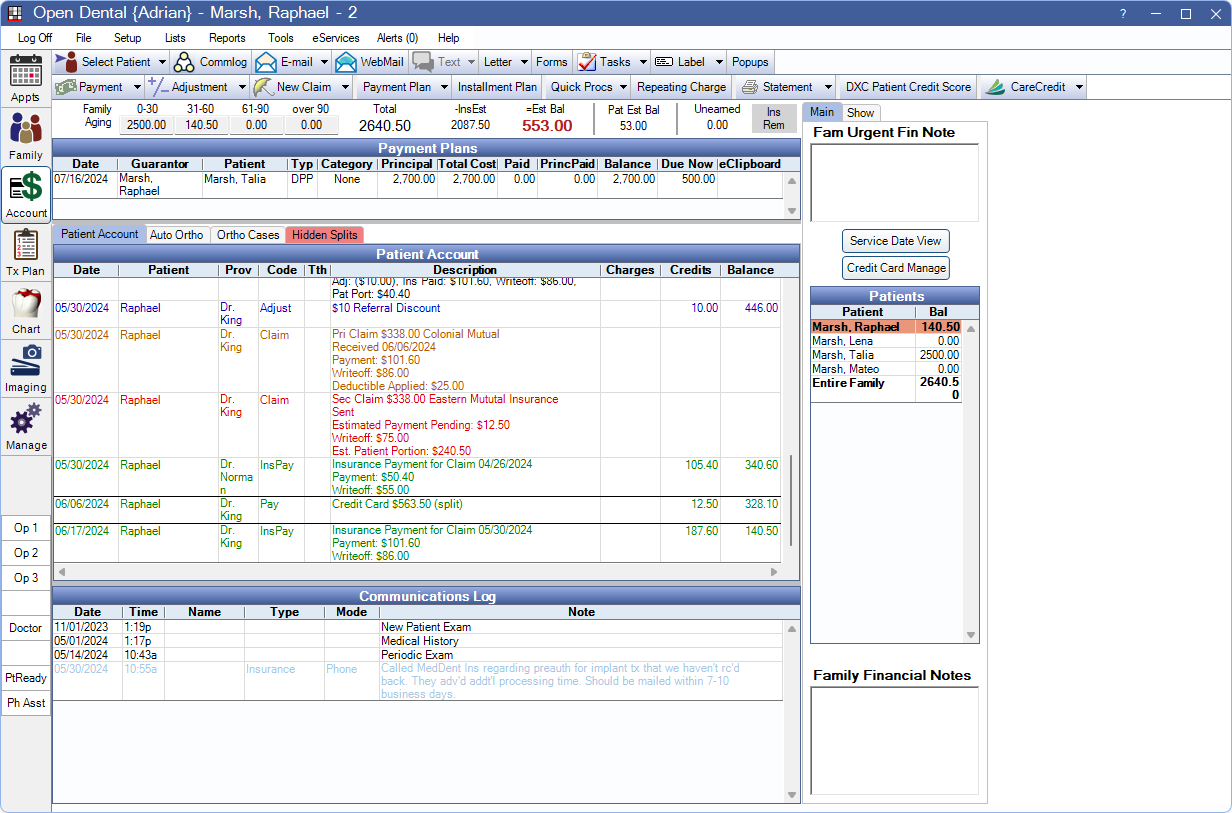
Set default Account Module options in Preferences and Allocations Setup.
 See our Account Module Playlist.
Account Toolbar

Payment: Click the button to enter a patient Payment.
- Allocate Unearned: Click the dropdown to Allocate Unearned Income.
- Income Transfer: Click the dropdown to perform an Income Transfer.
- Send Payment to eClipboard: For eClipboard Feature users. Click the dropdown to send statements and payments to eClipboard. See eClipboard: Payment.
- Send Message-to-Pay: Click to open the Message-to-Pay Edit. window. Send a text message or email for patients to quickly pay their balance online. For Payment Portal users only.
Adjustment: Select a single procedure and click the button to enter single negative or positive Adjustment. Select multiple procedures and click the button to Add Multiple Adjustments at once.
- Apply Sales Tax: Click the dropdown to apply Sales Tax.
- Add Multiple: Click the dropdown to create adjustments for multiple procedures at once.
New Claim: Click the button to create a Claim based on the patient's currently active insurance plans. Claims are automatically created for primary, secondary, and tertiary dental insurance plans. Click the dropdown for additional options:
- Primary: Create a primary dental claim.
- Secondary: Create a Secondary Insurance dental claim.
- Medical: Create a medical or institutional claim.
- Other: Create a claim for a specific insurance plan.
See Claim Types for additional details on how claims are created.
Payment Plan: Click to open a dropdown and select a payment plan type to create a new plan.
- Payment Plan: Create a Payment Plan for patient repayment agreements.
- Insurance Payment Plan: Create an Insurance Payment Plans for insurance repayment agreements.
Installment Plan: Set up Installment Plan. This is a simple alternative to a Payment Plan.
Quick Procs: Quickly chart a procedure to the account. See Quick Procs.
Repeating Charge: Add Repeating Charges to the patient's balance on a monthly basis.
Statement: Click the button to send a statement to the printer. Prints all transactions within Start Date / End Date set in the Show tab (see below). If no date range is set in the Show tab, uses the Start Date Last # Days set in Billing Defaults. Click the dropdown to select another option. See Statement.
- Walkout: Send a walkout statement directly to the printer. Displays information (procedures, payments, adjustments, etc) from today's date only, for the selected patient.
- Email: Email a PDF version of the full statement. Note: To securely email statements, see Billing Defaults. Regular email is not a secure method of sending statements (PHI).
- Receipt: Send a Receipt directly to the printer.
- Invoice: Generate an Invoice.
- Limited Statement: Generate a Limited Statement that only includes selected account items and associated transactions.
- Limited (Custom): Opens the Limited Statement Select window to select procedures, PayPlan Charge Due, patient payments, insurance payments, and adjustments.
- More Options: Opens the Statement Window to customize statement options.
Questionnaire: This feature is obsolete. Button only appears when the Questionnaire feature had been previously enabled.
Third-Party Integrations: Other third-party integrations and Program Links (i.e., bridges) may show a button in the toolbar, depending on setup. The following buttons show by default, but can be hidden from Program Links:
- DXC Patient Credit Score: See DentalXChange Patient Credit Score Service.
- TrojanCollect: See Trojan Express Collect.
- CareCredit: Launch the CareCredit Action window.
Aging and Balance Due

Family Aging: Displays the aging for the family balance. These amounts show the full balance, regardless of insurance estimates or expected write-offs. Every time a patient's account is opened, Aging is updated for accuracy.
Total: The total balance for all family members. The total does not take into account insurance estimates or expected write-offs.
Ins Est: Displays expected insurance payments for the entire family (estimated insurance payments + estimated write-offs).
- This number updates automatically when a claim has been created or received.
- If insurance estimates are changed on a NotReceived claimproc, use the Recalculate Estimates button on the Claim to update.
- Hover over the total to view details for Claim Procedures ( claimprocs ) with a status of Not Received or Pending Supplemental for the entire family.
Est Bal (bold red): The total estimated balance for the family after subtracting pending insurance amounts and write-offs. (Total - InsEst = Est Bal)
Pat Est Bal: The selected patient's balance after subtracting pending insurance amounts and write-offs.
Unearned: The total Unearned / Prepayment balance for the family.
- Hover over the total to view a breakdown.
- All pay splits with an unearned type within the family are summed by Definitions: PaySplit Unearned Types.
- If unearned income has been allocated to production, or a provider with no unearned type, using an income transfer, it is no longer included in the total. See Income Transfer and Allocate Unearned Income.
- No breakdown is displayed if the total unearned balance is zero.
Ins Rem: Hover over the box to see Insurance Remaining Calculations.
DPlan Rem: Hover over the box to see remaining discount plan benefits. This replaces Ins Rem when a patient has a Discount Plan Subscriber Edit.
- If using Payment Plans, the Pay Plan charge logic, set in Preferences, determines whether or not Total, Est Bal, and Pat Est Bal include Payment Plan amounts due.
- If the preference, Balances don't subtract insurance estimate, is enabled, the captions above balance information are different (Balance (bold red), Ins Pending, After Ins, Pat Est Bal). This option is useful if the office does not accept insurance assignment of benefits and the patient pays the full amount regardless of the insurance estimate.
- There is not a closeout process at the end of the month to put procedures into history. Instead, if the practice does not want previous entries to be altered, assign Permissions to users based on date. Older entries can still be changed, but only if the user has permission. Procedures themselves are protected from alteration when attached to a sent or received claim regardless of a user's Security settings.
Payment Plans

When the patient attached to a payment plan, as guarantor or patient, details are shown in the Payment Plans grid. Double-click a plan to view terms, amortization schedule, or to edit.
For details see: Payment Plan, Insurance Payment Plans, Installment Plan, and Old Payment Plan.
Patient Account Tab
The Patient Account tab displays line item details of the patient's account history. This includes all procedures, grouped by date with related claims, insurance payments, patient payments (and pay splits), adjustments, statements, invoices, and receipts. Depending on the option selected for the Pay Plan charge logic preference, Payment Plan Charges Due, Payment Plan Production, and payments may also show.
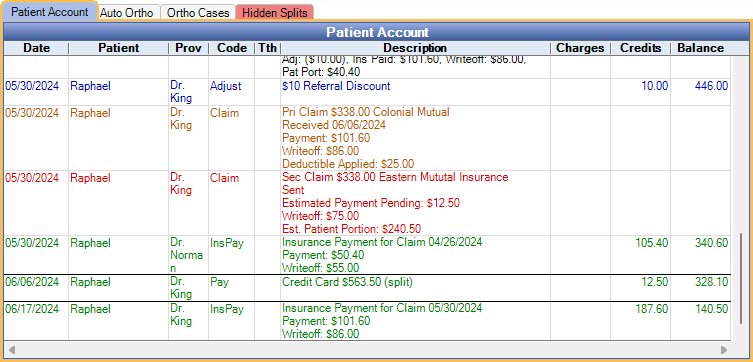
The sort order is as follows:
- All items are grouped by date, sorted oldest to newest.
- Items of the same type from the same date are grouped together in the following order:
- Procedures
- Adjustments
- Patient Payments and Income Transfers
- Insurance Claim
- Insurance Payment
- Payment Plan Charges Due (PayPln: Charge Due) and Payment Plan Production (PayPln: Production)
- Statements
- Procedures are further sorted and grouped by Treatment Area in the following order:
- No treatment area or Mouth
- Quad or Sextant
- Arch
- Surface
- Tooth
- Tooth Range
Double-click an item to edit. Click a claim or adjustment to highlight attached procedures.
- Customize text colors for entry types in Definitions: Account Colors.
- Customize the columns that show in Display Fields, Account Module.
- Running balances never take into account pending insurance estimates.
- Insurance payments use the payment date of the Claim Procedures ( claimprocs ) attached to the claim. If a claim has procedures with different payment dates, there are multiple line items for Insurance Payment for Claim.
Procedures marked as (In Process) are part of a group of procedures. These cannot be sent out on claims until all other procedures in the group have also been completed.
Right-click options: Options vary depending on the selected rows (e.g., payment vs. claim). Some options may be grayed out due to the user's Permissions.
- Select Attachment for DentalXChange: Opens the Select Image window to choose a file from the Imaging Module to create a claim attachment.
- Snip Attachment for DentalXChange: Launches the Snipping Tool to create a claim attachment.
- Paste Attachment(s) for DentalXChange: Pastes the current clipboard as a claim attachment and opens the Past Attachment window.
- View Sent Attachments for DentalXChange: Opens the Attachment History window to review current claim attachments.
- Add Adjustment: Opens the Edit Adjustment window. If a procedure was selected first, it is automatically attached to the adjustment.
- Refund: Option only available when an existing payment is selected. Creates a Refund payment for the original payment. The Payment window opens with the amount of the original payment (as a negative) and the original payment type selected. The paysplit is automatically allocated to the production item or unearned type of the original payment. Some payments cannot be refunded via the right-click option. These include:
- CareCredit and patient portal payments.
- Hidden prepayments.
- Payments attached to payment plans.
- Payments with negative Paysplits (e.g. income transfers, existing refunds).
- Payments allocated via an income transfer.
- Edit Charge: Open the Edit Payment Plan Charge window to make changes to the selected PayPln: Charge Due for a Payment Plan or Old Payment Plan. Not available for Payment Plan down payments.
- Delete Charge: Deletes selected unpaid PayPln: Charge Due attached to a Payment Plan or Old Payment Plan.
Auto Ortho Tab
This tab only shows if Show Auto Ortho in Account Module is enabled in Preferences.
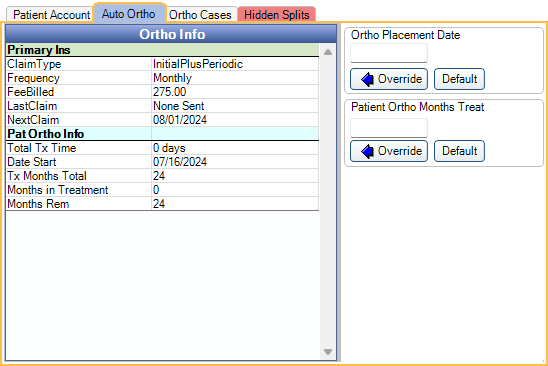
Displays the patient's Auto Ortho details.
Ortho Case Tab
This tab only shows if procedures are added to Ortho Case Procedures in Preferences.
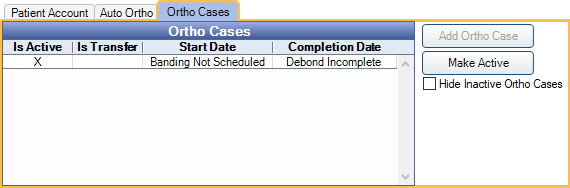
View the patient's Ortho Case details.
Hidden Splits Tab
The Hidden Splits Tab appears if an existing paysplit on the account is attached to an Definitions: PaySplit Unearned Types marked Do Not Show on Account.
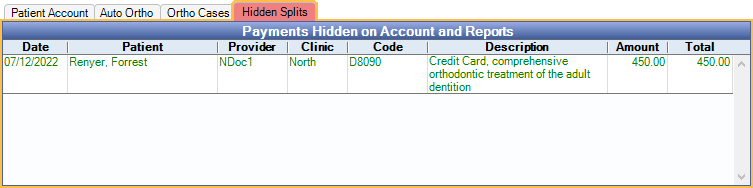
These are commonly paysplits attached to treatment planned procedures.
Communications Log (Commlog)
The Communications Log shows all Commlog entries for the family.

Entries with a blank Name are for the currently selected patient. Entries for other family members list their first name. There is a splitter between the main account grid and the log. Drag the splitter up or down to shrink or expand the log.
Main Tab
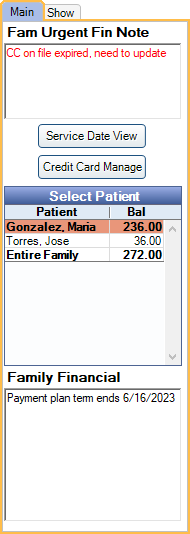
Fam Urgent Fin Note: This note applies to the entire family. It shows in red and is meant for very important financial notes. It also shows in red in a variety of other places throughout the program. This text box supports Right Click Text Box.
Service Date View: Click to open Service Date View.
Credit Card Manage: Manage stored patient credit cards. See Credit Card Manage.
Patients: Lists all family members. Click on a patient to switch patient accounts, or click Entire Family to view the account history for all family members.
- Show SuperFamily: Only available when Super Families are enabled in Show Features and the selected family is part of a Super Family. Check to show all families in the Super Family. See Super Family, Super Families in Account Module for more details.
- Patients manually set to Archived show in this list. Patients set to Archived due to a merge do not show unless the merged patient is currently selected.
Family Financial: These notes are not tracked in the Audit Trail. This is an older version of the Commlog. This text box supports right-click options.
Show Tab
Select which information displays in the Account Module.
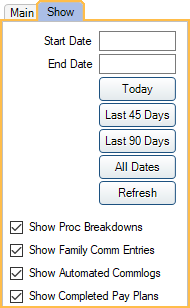
Start/End Date: Filter transactions by date on the Patient Account. Enter a start and end date manually then click Refresh, or click a button to select today only, Last 45 Days, Last 90 Days, or All Dates (no date range).
Show Proc Breakdowns: Display additional financial information in the description column for each procedure (e.g., patient portion, insurance paid, write-off, adjustment). This checkbox is user specific. To show the breakdown on statements, enable the preference, Show procedure breakdown.
Show Family Comm Entries: Show Commlog entries for the entire family rather than just for the current patient. Set whether this option is checked or unchecked by default in Preferences, Show family commlog entries by default.
Show Automated Commlogs: Show Commlog entries that have been automatically generated (e.g., Recalls, FHIR, web sched, etc). This checkbox is user specific, and affects automated Commlogs in the Account Module, Chart Module, and Appointment Edit window.
Show Completed Pay Plans: Affects all workstations. Show closed payment plans in the Payment Plans grid. When checked, and Entire Family is selected, the Payment Plans grid is always displayed, regardless of if any Payment Plans have been created.
Patient Information
This grid only shows fields are added to Display Fields, Account Patient Information.

Billing Type and Patient Fields can be displayed here.